
Omnix Studio editorial guide | Research updated October 13, 2026 | USD pricing for an international audience
You can get three quotes for the same website and see $4,000, $15,000, and $45,000. That does not automatically make one agency overpriced or another suspiciously cheap. They may be selling three completely different projects.
A redesign can mean changing fonts and rebuilding a few templates. It can also mean interviewing customers, replacing an outdated CMS, rewriting fifty pages, migrating organic traffic, connecting a CRM, and testing every lead form before launch. The visible homepage is only one piece of the budget.
So, how much does a website redesign cost in 2026? A useful public benchmark is roughly $3,000 to $75,000, according to WebFX’s redesign pricing guide. Agencies can also quote outside that band. Clutch’s September 2026 web design analysis reports a wider $2,000 to $100,000 agency pricing spectrum and says most reviewed design projects came in below $10,000. Those figures describe different datasets and kinds of work, so neither is a guaranteed quote for your project. [1][2]
The better question is: Which problems need fixing, what will the new website need to do, and what work is actually included? This guide answers that question, with sourced market context, transparent sample budgets, overlooked line items, and a worksheet you can use before asking for proposals.
Key takeaways
- Budget by deliverable, not by page count alone. A ten-page brochure site and a ten-page website with customer accounts, localization, or complex forms need different development effort.
- Published market estimates are broad. WebFX describes a $3,000–$75,000 redesign range; Clutch reports most reviewed web design projects below $10,000, alongside much larger engagements. [1][2]
- A refresh, redesign, and rebuild are different scopes. Decide which one you need before comparing prices.
- Plan beyond design and code. Content, SEO migration, accessibility, analytics, integrations, testing, and post-launch support change the final cost.
- Preserving a high-performing URL structure can reduce risk. Google recommends planning URL mappings, redirects, internal links, and monitoring when addresses change. [3]
- The lowest initial quote is not always the lowest total cost. Ask what remains after handoff: plugin licenses, hosting, fixes, training, maintenance, and future changes.
- Use an estimate, not a fantasy number. The three budgets below are original, clearly labeled planning examples, not invoices or verified industry averages.
Website redesign cost in 2026: the quick answer
There is no universal per-page price. Start by separating independently reported market information from a working budget range built for your project.
| Pricing reference | Reported figure | What it actually describes |
|---|---|---|
| WebFX redesign guide | $3,000–$75,000 | Broad website redesign pricing by scope and provider; its agency-specific band is $5,000–$75,000 |
| Clutch web design pricing guide, September 2026 | $2,000–$100,000 | Broad web design agency project spectrum, not exclusively redesigns |
| Clutch reviewed projects | Most under $10,000 | Distribution of projects reviewed on Clutch, not every project sold worldwide |
| Clutch shortlisted web design providers | Around $100–$149/hour | Clutch’s agency listing data; provider geography and specialty change rates |
Sources: WebFX [1] and Clutch [2]. Do not combine these into a statistically valid global average. They use different definitions and methodologies.
Many straightforward small-business redesigns will sit toward the lower end of these ranges. Sites with complex content migration, custom interactions, multiple stakeholders, regulated workflows, or advanced commerce can cost substantially more. It is the scope, not the adjective “professional,” that explains the difference.

First, decide what kind of redesign you need
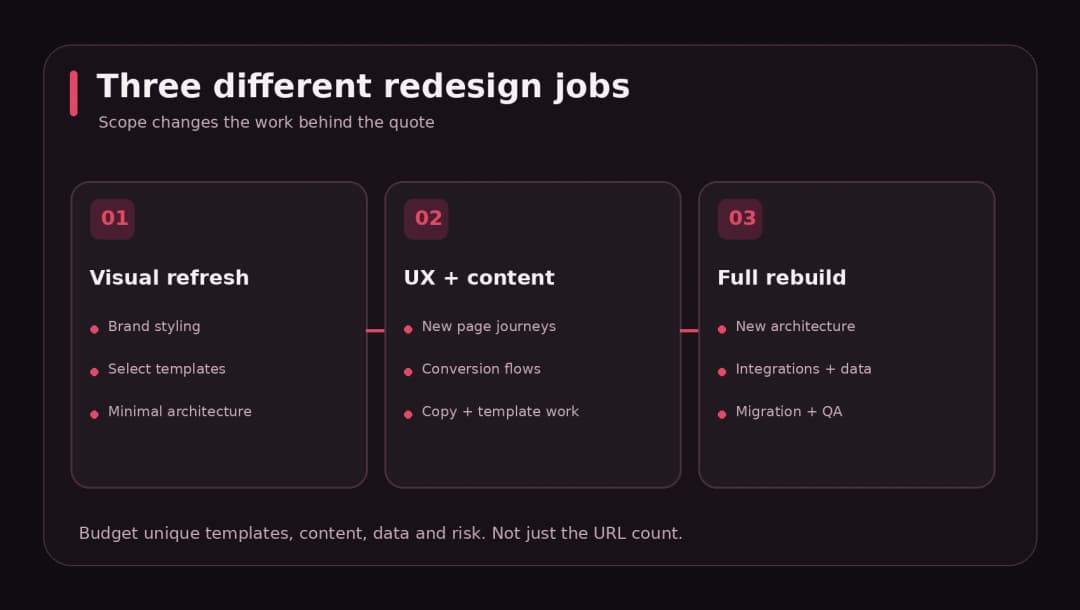
Before contacting an agency, distinguish these three jobs. They sometimes overlap, but they should not be priced as though they are identical.
1. A visual refresh
A refresh keeps the basic website architecture. You refine typography, spacing, color, imagery, section composition, and selected templates. Content and functionality remain mostly unchanged.
This can make sense when navigation already works, page speed is acceptable, and the main problem is a dated presentation. It can be significantly cheaper than a rebuild because it avoids major architectural changes. But do not mistake a fresh coat of paint for a solution to broken forms, confusing user journeys, or slow pages.
2. A strategic UX and content redesign
Here, the team changes what the website says and how it works for visitors. You might reorganize navigation, redesign service pages, rebuild key templates, rewrite headlines, rethink forms, and improve mobile behavior. The underlying CMS can often stay.
For a service company that generates leads, this is frequently the most valuable middle path. Instead of recreating every page, you improve the templates and journeys that matter most: homepage, service detail, proof, pricing, and contact.
3. A full rebuild or migration
A rebuild replaces major technology or information architecture. It might involve moving from a page builder to a custom WordPress theme, from an older CMS to WordPress, or from a conventional site to a Next.js application with a headless CMS.
Now the cost includes migration scripts, redirects, data mapping, content QA, hosting, integrations, and rollback plans. This is where the project stops being mainly visual. The delivery risk also rises because there are more ways to interrupt existing users and search traffic.
| Approach | Typical work | Major pricing variable | Watch out for |
|---|---|---|---|
| Visual refresh | Styling, images, layout cleanup, selected templates | Number of unique designs | Old UX and technical issues remain |
| UX and content redesign | Discovery, journeys, content, templates, conversion fixes | Depth of research and content work | Copy and approvals falling outside scope |
| Full rebuild | New architecture, CMS, integrations, migration, QA | Technical complexity and migration risk | Missing redirect, rollback, or post-launch plan |
Nine factors that change the cost
1. How many unique page templates need work?
Count unique templates before counting URLs. A 100-article blog may need one article template, one archive template, and a few reusable modules. A ten-page site with ten bespoke layouts may require more design effort.
Ask the provider to list the templates included: homepage, service page, industry page, blog post, archive, contact, product, checkout, account, and any special landing pages. Then separate template work from the work of entering content into those templates.
2. Research and information architecture
Is the redesign based on a visual mood board or evidence from customers and analytics? A discovery phase can include stakeholder interviews, current-site review, navigation analysis, customer journey mapping, and wireframes. This work increases the upfront budget, but it gives the design decisions a purpose.
If your biggest problem is low-quality leads, discover whether people misunderstand the offer before experimenting with button colors. Research should be scoped to the risks you actually have; not every five-page site needs a six-week workshop.
3. Content writing and migration
Who writes the headlines, product descriptions, FAQs, case studies, legal pages, and metadata? Who checks every old blog image, filename, and internal link? Many proposals describe “20 pages” without stating whether writing, uploading, formatting, editing, and redirects are included.
Content migration is not just copying and pasting. Plan for page inventory, redirects, taxonomy cleanup, image paths, embedded forms, author attribution, and internal links. A careful migration takes time precisely because the old site may already attract visitors.
4. Custom design versus theme and component reuse
A mature design system or adaptable WordPress theme can shorten production. A fully custom interface, unique illustrations, motion design, and detailed interaction states take more hours. Neither choice is inherently better.
Reuse saves money when the existing system fits your business. It becomes expensive when every template requires a workaround or your brand needs a distinct experience that the chosen theme cannot support cleanly.
5. Development platform and existing technical debt
WordPress, Webflow, Shopify, and a custom React or Next.js stack solve different problems. A CMS that lets staff update content without a developer can lower ongoing work. A custom stack can make sense when the site behaves more like an application or requires unusual integrations.
Before rebuilding, audit what you already have: hosting, theme code, plugins, forms, tracking, integrations, and performance. Replacing a broken setup without understanding it can reproduce the same problems in a more expensive system.
6. eCommerce, membership, and integrations
A brochure site may need little more than a contact form. A store may need product imports, payment flows, subscriptions, shipping, taxes, order notifications, discounts, inventory sync, and transactional email. A member portal may add permissions and private data.
Scope each integration by direction and failure behavior: does the website send leads to a CRM, receive customer data, or both? What happens if the remote service is unavailable? “CRM integration included” is not enough to assess effort.
7. Accessibility and performance testing
Accessibility is not a decorative final check. The W3C’s WCAG 2.2 guidance includes considerations such as focus visibility, target sizing, and accessible authentication. A project aiming for WCAG 2.2 AA needs design, keyboard testing, semantics, content checks, and manual review, not a plugin badge. [4]
Performance testing also deserves its own line. Budget for image handling, fonts, scripts, caching, responsive behavior, and field monitoring. Do not accept a promise of a perfect PageSpeed score as evidence that every page and real-world device will perform well.
8. Search visibility, tracking, and launch risk
If URLs change, budget for a crawl of existing pages, one-to-one URL mapping, server-side permanent redirects, updated internal links and canonicals, XML sitemaps, and post-launch Search Console monitoring. These tasks are explicitly covered in Google’s guidance on site moves. [3]
Track form submissions, calls, demo requests, orders, and other real business outcomes before replacing the site. Otherwise, you may not know whether the redesign improved anything.
9. Project management, reviews, and stakeholder time
The same design can cost more when seven people must review every page, a legal team signs off on copy, or changes arrive after a milestone was approved. Ask how many revision rounds are included, who consolidates feedback, and what constitutes a new request.
A realistic budget also includes the owner’s time: gathering assets, approving copy, arranging access, testing processes, and making decisions. The agency invoice is not the entire organizational cost.
Three transparent website redesign budget examples
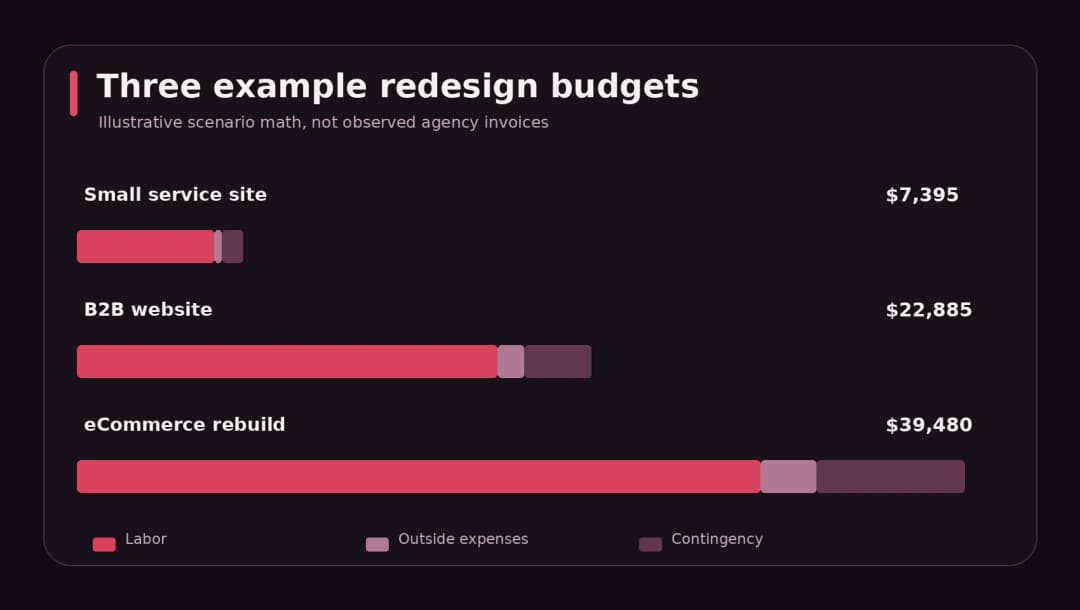
The following examples are constructed planning models. They show how hours, rates, expenses, and contingencies combine. They are not Omnix Studio rate cards, quotes from other agencies, or measured industry averages. Use them to understand the math and substitute your own project assumptions.
Example A: A small service-company redesign
Brief: Eight content pages, one reusable service template, a contact form, basic analytics, and no substantial URL migration. The business supplies most copy.
| Workstream | Assumed hours |
|---|---|
| Discovery and page inventory | 12 |
| Wireframes and visual design | 22 |
| WordPress build and forms | 36 |
| Content formatting and checks | 12 |
| Mobile, accessibility, SEO, and launch QA | 12 |
| Total labor | 94 |
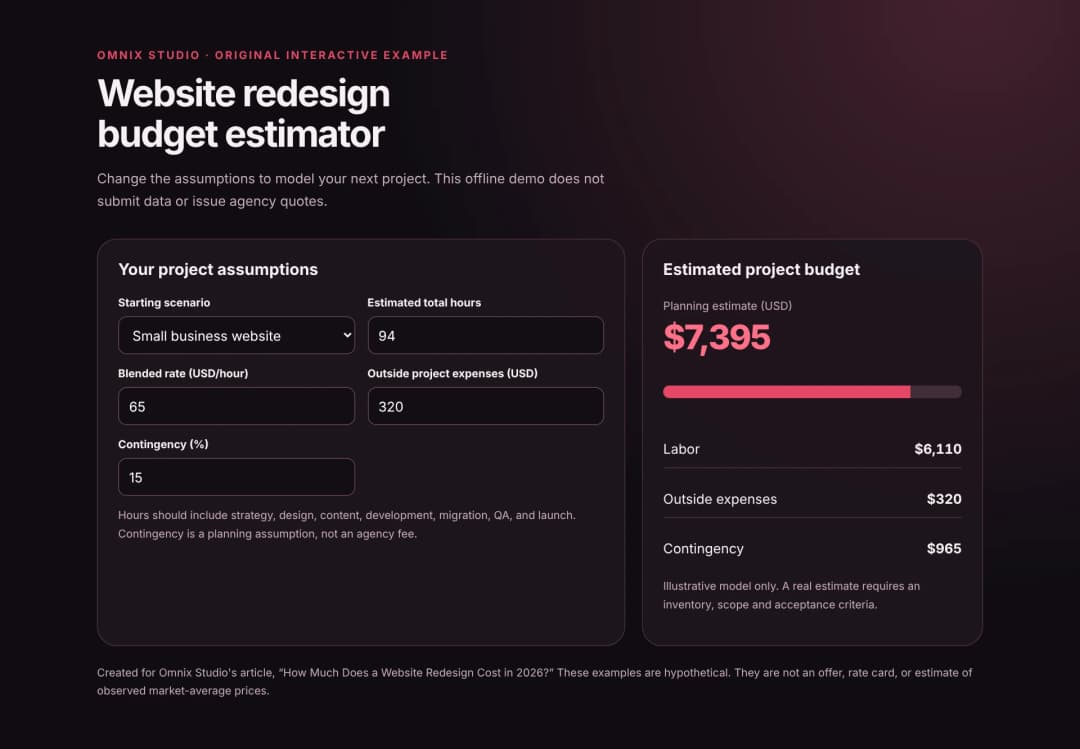
At an illustrative blended rate of $65/hour, labor is $6,110. Add $320 in assumed project expenses, then a 15% contingency on the combined $6,430. The resulting planning budget is approximately $7,395. If the business requires fresh copywriting or third-party integrations, recalculate rather than treating this model as fixed.
Example B: A growing B2B website
Brief: Twenty-eight pages based on several layouts, more involved positioning work, content migration, CRM forms, and review by multiple stakeholders.
| Workstream | Assumed hours |
|---|---|
| Discovery, content inventory, and architecture | 24 |
| UX and reusable visual components | 45 |
| CMS development and integrations | 92 |
| Content work and SEO migration | 34 |
| QA, performance, launch, and training | 25 |
| Total labor | 220 |
At an illustrative blended rate of $85/hour, labor is $18,700. Add $1,200 for assumed licensed assets and project expenses, plus a 15% contingency. The planning budget is about $22,885.
Notice that this project does not cost 3.5 times as much because it has 3.5 times as many pages. The extra work comes from unique templates, copy, integration, approvals, and migration controls.
Example C: An eCommerce rebuild
Brief: A store with customized merchandising, payment and shipping workflows, product migration, and SEO preservation.
| Workstream | Assumed hours |
|---|---|
| Discovery and system inventory | 32 |
| Storefront UX and design system | 55 |
| Development, checkout, and integrations | 128 |
| Product/content migration and SEO | 45 |
| Test orders, accessibility, and launch QA | 44 |
| Total labor | 304 |
At an illustrative blended rate of $100/hour, labor is $30,400. Add $2,500 in assumed technical expenses and a 20% contingency. The planning budget becomes $39,480. Complex ERP connections, subscriptions, multi-region taxes, or atypical customer accounts could push the scope higher.
A reusable formula to estimate your own cost
Instead of choosing a round number from a vendor blog, build a rough cost model:
Estimated project budget = (estimated hours × blended hourly rate + external project expenses) × (1 + contingency percentage).
For a fixed-fee proposal, use this internally to understand what the price might cover. The provider’s actual pricing may also reflect specialist availability, business risk, overhead, ownership rights, and margin. Hours are a planning device, not proof of what an agency must charge.
Start with workstreams, not an arbitrary price per screen. For each workstream, estimate a lower and upper effort. Identify one decision-maker, assign an owner for content, and list dependencies. Then add a contingency proportionate to uncertainty. A light template refresh should carry less unknown work than a migration with undocumented custom integrations.
Use our original redesign budget estimator
The accompanying editable HTML estimator lets you change hours, rate, outside costs, and contingency and see the revised total instantly. It works locally in a browser and does not send data to any service. It is a planning aid, not an automated agency quote.
The hidden costs that turn a cheap quote expensive
Copy that is “client-supplied”
Someone still has to write it. If your team is unavailable to write twenty pages, a cheap design proposal will wait for content or accumulate change requests. Ask whether copy strategy, writing, editing, and upload are separate deliverables.
Redirects that are “handled later”
An SEO migration is cheaper to plan before launch than to diagnose after rankings and referral links break. Ask for an old-to-new URL mapping file and a post-launch monitoring window. Google recommends permanent redirects where appropriate, direct routing rather than long chains, and keeping redirects in place long enough for search engines and users to reach the new URLs. [3]
Plugin and platform subscriptions
The build may depend on recurring hosting, premium plugins, third-party APIs, fonts, email services, or a managed CMS. Who owns the accounts? Are licenses transferable? What happens if support stops? A complete quote separates one-time implementation from recurring subscriptions.
Maintenance and security
A site does not stop changing at launch. WordPress documentation advises keeping themes and plugins updated and maintaining backups so the site can be restored if updates fail. [5] A maintenance agreement should specify backups, update testing, uptime monitoring, security response, small content edits, and time-to-response rules. Do not confuse hosting with maintenance.
Analytics that do not survive the migration
A beautiful new site with broken event tracking can make marketing reporting less useful than before. Build a tracking plan that names each conversion, where the event fires, who tests it, and where it appears in reports.
Accessibility fixes outside the design review
A missing accessible name, unusable keyboard menu, or error message that a screen reader cannot discover can require component rework. Include accessibility acceptance criteria early rather than buying an expensive patch at the end.
A rushed launch without a rollback plan
Plan a deployment window, database backups, DNS and caching behavior, a smoke-test checklist, and a named person who can revert the release. For stores or membership sites, include test transactions and permission checks. These tasks are less visually exciting than a homepage, but their absence can be expensive.
What should a redesign proposal include?
Ask each provider to quote the same deliverables. A low quote may simply leave critical tasks unpriced. Compare the work, responsibilities, assumptions, and acceptance criteria, not only the total.
| Proposal section | Questions to ask |
|---|---|
| Scope and goals | What business outcomes and pages are included? |
| Discovery | Are audit, analytics review, sitemap, and wireframes included? |
| Design | How many distinct templates, screen sizes, and revisions? |
| Content | Who writes, supplies, migrates, and approves the copy? |
| Development | What CMS, integrations, forms, accounts, and permissions? |
| Technical SEO | URL inventory, redirects, metadata, canonicals, sitemap, monitoring? |
| Quality checks | Responsive, keyboard, screen-reader, performance, regression, forms? |
| Launch | Backups, staging, DNS, rollout, rollback, ownership, training? |
| Aftercare | How long are bug fixes, support, and maintenance included? |
| Ownership | Who controls the domain, hosting, designs, code, content, and analytics? |
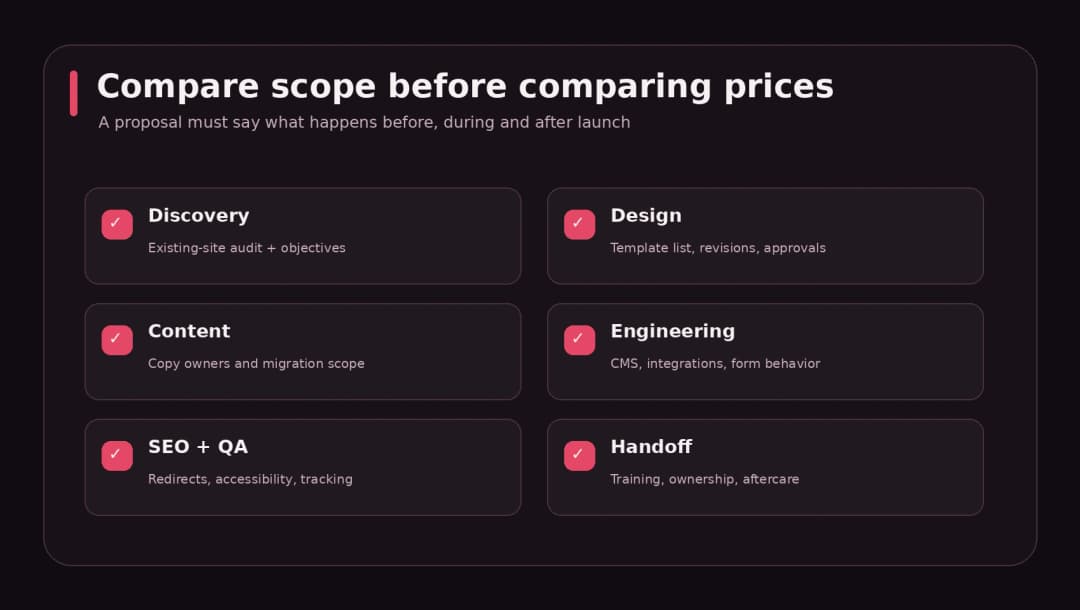
Make acceptance criteria tangible. “Responsive” is vague; “tested on agreed mobile widths with no horizontal overflow and usable forms” is much easier to verify. “SEO-friendly” is vague; “existing priority URLs mapped, redirects checked, titles carried forward or revised deliberately, and Search Console monitored” describes a job.
Freelancer, small agency, or in-house team?
Each delivery route has a place. A freelancer can be a sensible choice for a small, well-defined refresh with few integrations. A small agency helps when UX, copy, design, development, and QA must move together. A larger firm may have the capacity and specialist coverage for complex organizational work. An internal team is attractive when redesign is part of continuous product development and context matters every week.
Clutch’s 2026 listings show substantial differences by discipline and geography. For web design, its shortlisted-company guide describes rates around $100–$149/hour, while its separate web development guide says many development agencies charge $25–$49/hour globally, with regional variation. Those figures are drawn from different provider populations and should not be collapsed into one “average developer” rate. [2][6]
Choose around accountability: Who owns the outcome? Who fixes broken forms? Who audits the content? Who documents custom code? A slightly higher proposal that includes those answers may be cheaper after the first six months.
WordPress, Webflow, or custom development: does the platform change the price?
It can. Platform fit often affects how much unique code is required, who can maintain the site, and what subscriptions remain.
WordPress: Often practical for content-heavy business websites. A well-structured theme and reusable blocks can reduce editing costs. Budget separately for specialized plugins, security maintenance, and builder cleanup. WordPress is not automatically cheap if the current installation has years of custom code and undocumented dependencies.
Webflow: Can be efficient for design-led marketing sites whose editors will work within its CMS model. Consider CMS collections, interactions, localization, hosting plans, forms, and how content ownership and migration work. Avoid assuming switching platforms will improve SEO by itself.
Custom Next.js or React: May make sense for sites with application-like interactions, complex integrations, or tight control over performance and architecture. Allow time for CMS design, deployment, testing, and developer handoff. For a simple five-page brochure, extra engineering may not create enough business value to justify itself.
Treat platforms as implementation choices inside the scope, not magic pricing tiers. The same well-defined goals should guide each proposal.
How to reduce website redesign costs without cutting quality
- Fix the business problem first. If your issue is a poorly structured contact page, you may not need to rebuild the blog and resource center.
- Protect the pages that already work. Identify organic landing pages, conversions, backlinks, and key content before proposing URL changes.
- Use reusable components. A button, testimonial section, pricing card, and page layout should not each be redesigned on every page.
- Deliver content on time. Assign one owner for copy and imagery so development is not blocked by missing approvals.
- Split essentials from enhancements. Launch reliable core flows before requesting complex animation or secondary integrations.
- Clarify revisions. Consolidated feedback reduces repeated work and conflicting directions.
- Request a phased proposal. A fixed discovery phase can expose the real effort before committing to a full rebuild.
- Keep ownership simple. Use your own domain, hosting, analytics, and third-party accounts, with clear handoff instructions.
The objective is not to eliminate research, testing, or migration planning. It is to remove work that does not solve a meaningful user or business problem.
How to know whether a redesign pays for itself
Visual improvement alone is not a business case. Decide which outcomes should change: qualified inquiries, booked consultations, checkout completion, product discovery, time spent editing content, support tickets, or site speed.
For a simple illustrative lead-generation scenario, assume a redesigned site produces five additional qualified inquiries each month. If 15% of those become customers and each new customer contributes $1,500 in gross margin, the incremental modeled monthly contribution is 5 × 0.15 × $1,500 = $1,125. A $9,000 redesign would take 8 months to cover its cost in this simplified model. It excludes taxes, campaign costs, maintenance, changing attribution, and uncertainty. The example is a way to think about payback, not a prediction that a redesign will produce those leads.
Set a baseline before launch, monitor the same definitions afterward, and avoid claiming causation from a simple before/after comparison when traffic sources or seasonality have changed.
A sensible website redesign timeline
A focused redesign could move through discovery, design, build, review, and launch fairly quickly. A complex migration takes longer because requirements, stakeholder approvals, and content dependencies are harder to compress. Do not take a generic “two-week redesign” estimate seriously without understanding what it excludes.
A reasonable project plan names milestones: current-site audit; sitemap and template approvals; content and visual designs; staging build; internal test; migration rehearsal; go-live; and post-launch monitoring. Each milestone should have a concrete approval requirement. That does more to protect the budget than a vague promise to work fast.
Before you hire: a 10-question redesign checklist
- Can we explain the business problem in one sentence?
- Have we inventoried live URLs, high-value pages, and existing conversions?
- Do we know which templates and workflows must change?
- Is copywriting and content upload assigned to a named owner?
- Are integrations and data-migration requirements documented?
- Is accessibility testing explicitly scoped?
- Do we have technical SEO, analytics, redirect, and rollback plans?
- Are recurring hosting and software costs separated from the project fee?
- Does the proposal define revisions, acceptance criteria, and post-launch support?
- Will we own the website, accounts, code/design files, and documentation after handoff?
Copy these questions into the accompanying budget worksheet and use the same answers with every bidder.
When a smaller update is better than a redesign
Sometimes the right answer is not a redesign at all. If your pages are clear, conversion rates are healthy, and the website is technically sound, a targeted landing-page experiment or performance fix may create more value for less money. On the other hand, serious navigation confusion, inaccessible forms, fragile plugins, or a CMS your team cannot maintain may justify more structural work.
Start with an audit. The budget should respond to the evidence, not a calendar reminder that websites need a fresh appearance every few years.
How Omnix Studio approaches redesign planning
At Omnix Studio, design, WordPress development, custom websites, SEO, and website maintenance sit within one service offering. That means a redesign conversation can address user journeys, content, implementation, search visibility, and the support plan together rather than treating the homepage as an isolated illustration.
If you want help identifying what to keep, what to replace, and what a realistic project scope should include, explore Omnix Studio’s website design and development services or our custom website design and development offering. You can also read our existing guide to wireframing tools for UX designers if your first challenge is mapping page structure.
The most useful starting point is a one-page brief: what the website does today, what it should do next, which pages and systems must survive, and who will approve the work.
Frequently asked questions
How much does it cost to redesign a small business website?
It depends on whether the work is a visual refresh, a strategic content/UX redesign, or a rebuild. WebFX reports a broad $3,000–$75,000 redesign range and Clutch’s September 2026 web design analysis says most reviewed projects were below $10,000. For a useful personal estimate, inventory templates and content work, then price the actual deliverables. [1][2]
Is it cheaper to redesign an existing website or build a new one?
A redesign can cost less if the CMS, content, URLs, and backend are reusable. It can cost more than a new brochure site when legacy code, a large content inventory, or broken integrations must be untangled. Compare the risks and work involved, not the labels.
How much should I budget for a WordPress website redesign?
Budget according to the theme or custom build, templates, plugin dependencies, copywriting, SEO migration, integrations, and maintenance. A template refresh and a bespoke commerce rebuild are different jobs even when both use WordPress. Use the included worksheet rather than adopting an unsupported “WordPress average.”
How long does a website redesign take?
A limited refresh can be short; a substantial redesign may take multiple weeks or months. Timeline depends on approvals, unique templates, content readiness, integration work, and testing. Ask for milestones and dependencies in writing.
Does redesigning a website hurt SEO?
It can if important content disappears, URLs are changed without appropriate redirects, internal links break, or indexing controls remain on the launched site. Google’s migration documentation outlines preparation, URL mapping, redirects, and post-move monitoring. Plan those tasks before launch. [3]
Should I hire a freelancer or an agency?
A freelancer is often sufficient for a small and clearly scoped project. Agencies can be more useful when the project requires coordinated strategy, writing, design, engineering, and QA. Compare accountability and deliverables alongside price.
Can AI make a website redesign cheaper?
AI can speed up ideation, drafts, repetitive code, and asset preparation, but it does not remove the need for content accuracy, accessibility, mobile testing, security, SEO mapping, and human approval. Count what it actually saves, including review and correction time.
What is usually not included in a redesign quote?
Common exclusions include writing, stock photography, premium licenses, hosting, domain/email administration, CRM integration, redirects, accessibility testing, analytics setup, training, and ongoing support. Ask every provider to identify exclusions explicitly.
Sources and editorial notes
This article uses published 2026 pricing guides, official technical guidance, and clearly labeled sample mathematics. It is not based on a proprietary pricing survey, a measured series of client invoices, or a quote from Omnix Studio. Data and rates should be checked again before publication.
- WebFX, Website Redesign Pricing (accessed October 2026).
- Clutch, Web Design Pricing Guide, updated September 21, 2026.
- Google Search Central, Site Moves with URL Changes.
- W3C, What’s New in WCAG 2.2.
- WordPress.org, Plugin and Theme Auto-Updates.
- Clutch, Web Development Pricing Guide, updated September 21, 2026.