Omnix Studio editorial comparison | Updated October 13, 2026 | Research method: official product documentation, feature verification, and practical evaluation criteria. No proprietary conversion-rate benchmark or paid-plan hands-on testing was performed.
A landing page can look convincing and still be a bad place to send your next 10,000 ad clicks. The headline may not match the ad. The form might stop sending leads to your CRM. Or the page could be beautiful on a large monitor and awkward on an actual phone.
AI landing page builders solve part of that problem: getting a credible first draft onto the screen. But they solve different parts of the work after that. Framer and Webflow lean into visual design and site management. Unbounce, Instapage, Leadpages, and Landingi are built around campaign delivery and optimization. Wix makes the most sense when the landing page belongs to a broader small-business website.
This guide compares seven options using a more useful question than Which AI can make a page fastest? Which platform helps your team turn the page into a measurable, maintainable campaign?
Key Takeaways
- Framer suits design-led startups and small teams that want AI-generated beginnings, fine visual control, and a publishable marketing site.
- Webflow suits established brands and marketing teams building reusable design systems and multiple pages. Its AI site builder has restrictions for existing sites; its advanced optimization is a distinct product.
- Unbounce makes sense for paid-traffic marketers who need landing-page variants and Smart Traffic routing. Its Classic and Smart Builders do not share every capability.
- Leadpages offers a direct AI prompt-to-page workflow, lead capture, and testing options. Verify the specific plan’s experimentation access before buying.
- Instapage fits teams running many ad groups and landing-page variations, with AI content and advanced experimentation. Its full AI page-generation feature is rolling out gradually.
- Landingi is worth considering for agencies and multi-campaign teams: Lunar generates pages, Solis analyzes behavioral signals, and programmatic pages support repeatable campaigns.
- Wix is the practical choice when a landing page is only one part of a service business’s main website, appointments, and broader online presence.
The real decision: If you mainly buy traffic, prioritize tracking and experimentation. If you mainly need a distinctive website, prioritize design control and maintenance. If you need both, test the complete publishing and measurement workflow, not merely the AI prompt box.
What Counts as an AI Landing Page Builder?
A landing page builder should help produce a focused page for a specific offer: a demo request, webinar registration, product launch, waitlist, or purchase. To qualify for this list, the vendor must provide a documented AI-assisted step in page creation, page content, or conversion optimization, alongside a way to build and publish the page.
That does not mean all seven can generate an equally complete page from one sentence. Some platforms are traditional visual editors with an AI layer. Others offer a dedicated prompt-to-page generator. Still others use machine learning mostly to choose which page variation visitors see. Treating these as interchangeable is how teams buy the wrong subscription.
For this comparison, we checked official documentation and product pages available on October 13, 2026. The recommendations are based on workflow fit, not invented ‘tested conversion lifts,’ fabricated speed trials, or scores copied from vendors. Prices, eligibility, AI credits, and experimental features can change quickly. Use the official pricing page to confirm your actual plan before committing.
The 7 Best AI Landing Page Builders at a Glance
| Tool | Best for | AI contribution | Check before buying |
|---|---|---|---|
| Framer | Design-led startup pages | AI drafts editable pages and sections | Testing, traffic and team-plan needs |
| Webflow | Multi-page marketing sites | AI site generation and assisted editing; separate optimization | Existing-site AI builder limits and Optimize access |
| Unbounce | Paid-traffic campaigns | AI-assisted building and Smart Traffic | Builder-dependent capabilities and variant setup |
| Leadpages | Lead-gen campaigns | Prompt-to-page and variant assistance | Plan-specific A/B testing and heatmaps |
| Instapage | Complex ad portfolios | AI copy, experiments and phased prompt-to-page | Feature rollout and campaign costs |
| Landingi | Agencies managing many pages | Lunar AI generator and Solis insights | Credit usage and analytics access |
| Wix | Small-business websites | Conversational AI site generation | Experimentation depth and portability |
This is an editorial fit matrix. It does not rank the platforms by measured speed, conversions, or customer satisfaction.
1. Framer: Best for Design-Led Landing Pages
Official site: framer.com
Best for: startups, creative agencies, SaaS marketers, and designers who want the landing page to feel like part of a coherent brand.
Framer is no longer merely a tool for turning a wireframe into a pretty website. Its AI landing-page documentation describes an agent that can draft sections, copy, and layouts while leaving the result editable on the visual canvas. Forms, custom domains, SEO controls, analytics, publishing, and responsive adjustments live inside the same website workflow. Source: Framer AI landing pages.
That last detail matters. When the generated headline sounds generic, you can rewrite it. When the mobile layout feels cramped, you can revise the responsive breakpoint. When the next launch needs a page using the same components, you do not have to start from scratch.
Where Framer works particularly well
Consider a software startup with a product waitlist, a feature announcement page, and a customer story. The team wants a consistent type scale, one clear visual language, and someone on the marketing side who can publish changes without a development sprint. Framer is appealing because the publishing workflow stays close to the design canvas.
Strengths: granular visual control; editable AI-generated sections; an integrated hosting/SEO/publishing path; a designer-friendly environment. Framer also promotes analytics and experimentation features, but confirm what your chosen plan actually includes.
Tradeoffs: strong creative freedom can make consistency difficult without a system. A/B testing, localization, and extra traffic or sites may affect the total cost. A beautiful page still needs real conversion events, a functioning form destination, and a reliable mobile layout.
Our verdict: Choose Framer when design quality and iteration speed matter more than specialized paid-ad operations. For large ad portfolios, compare its experimentation workflow against a dedicated landing-page platform before committing.
2. Webflow: Best for Marketing Teams With a Design System
Official site: webflow.com
Best for: brands building several campaigns inside a structured marketing website, especially when multiple editors and reusable design elements are involved.
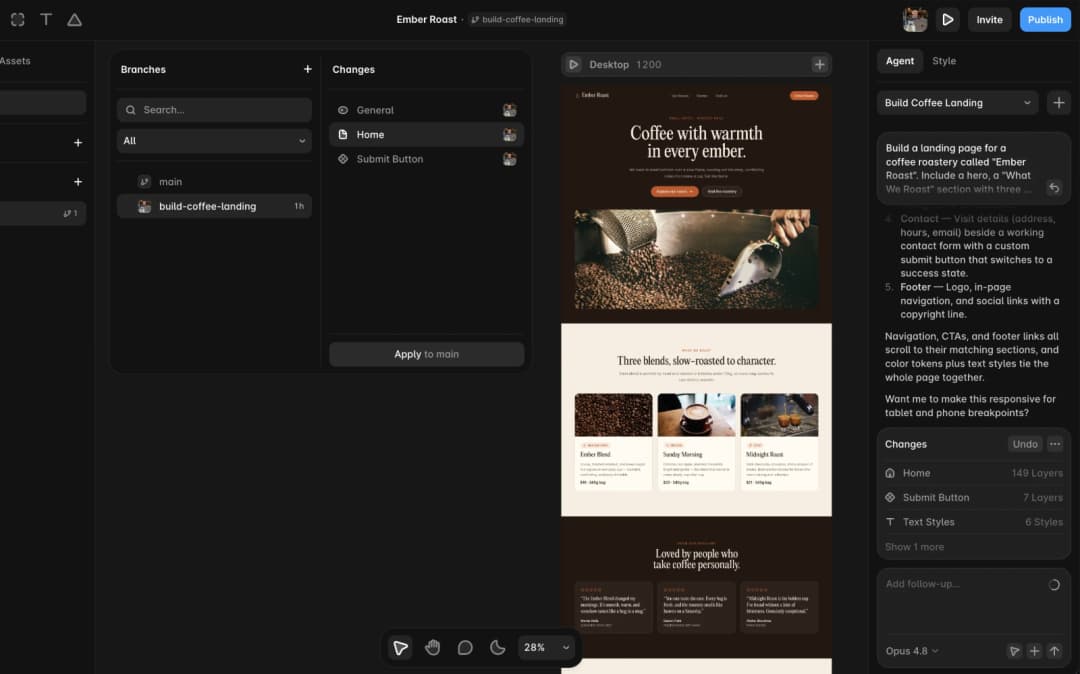
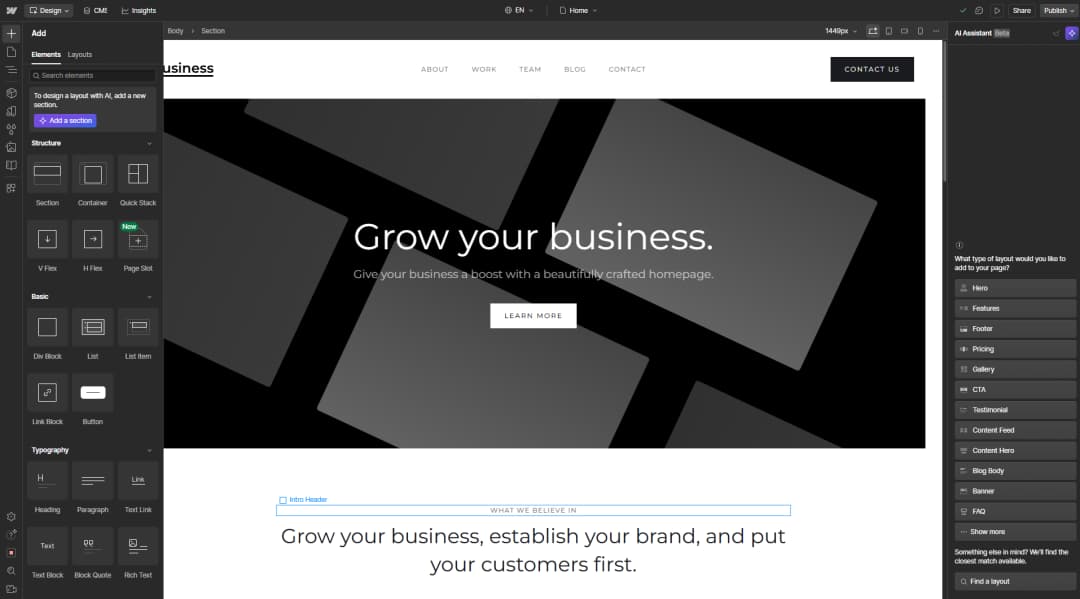
Webflow’s AI site builder creates site structure, content, and a theme from a brief, with editing in the standard Webflow environment afterward. Its documentation records a crucial limitation: the AI site builder is designed for new sites and sites originally created with it. You cannot apply that specific AI-generation flow to any arbitrary existing Webflow site. That is easy to miss when the marketing promise is summarized as ‘AI edits your website.’ Source: Webflow AI site-builder requirements.
Webflow also offers AI-assisted copy and, in a constrained public beta, section generation tailored to an existing site’s styles. Those are not the same thing as regenerating an existing site. Source: Webflow AI Assistant constraints.
For optimization, Webflow Optimize can run experiments, create audience-specific variations, and use AI to allocate experiences. That is a distinct optimization capability with its own requirements, not a promise that every entry-level Webflow plan gets sophisticated AI A/B testing for free. Source: Webflow Optimize overview.
The practical use case
Imagine a B2B SaaS team with industry-specific pages for accounting firms, agencies, and retail businesses. The design needs consistency across those pages, and content editors need structured workflows. Webflow’s component and CMS model can be a better long-term home than maintaining dozens of unrelated campaign pages.
Strengths: design and CMS depth; reusable systems; nuanced marketing-site control; separate optimization and personalization options.
Tradeoffs: more complexity than a one-off landing-page generator, some AI features have eligibility conditions, and advanced optimization is a separate purchasing decision.
Our verdict: Choose Webflow when campaign pages belong to a larger content and branding operation. Do not choose it on the assumption that the AI site builder will retrofit an existing non-AI site automatically.
3. Unbounce: Best for Paid-Traffic Marketers
Official site: unbounce.com
Best for: agencies and performance marketers spending enough on ads to care deeply about controlled page variants, conversion goals, and traffic allocation.
Unbounce is a conversion platform first, and its AI story is broader than generation. Its Smart Traffic feature routes visitors among published variants based on learned performance patterns. The current support guide specifies that it requires at least two variants and a learning period; it does not promise a winning experience before there is visitor data. Source: Unbounce Smart Traffic setup.
Unbounce also has both Classic Builder and Smart Builder experiences. They are not perfectly interchangeable. For example, its documentation says downloading and re-uploading a page is supported for Classic Builder pages, not Smart Builder pages. That small-sounding restriction can matter during a migration or client handoff. Source: Unbounce page transfer limits.
A useful campaign example
A paid-search team runs ads for a ‘book a product demo’ offer. Two landing-page versions have different proof arrangements: one leads with industry logos, the other with a short customer story. Smart Traffic can eventually allocate more visitors toward better-matching variants; the team still needs to validate lead quality in its CRM.
Strengths: landing-page-centric workflow; variant testing; Smart Traffic; clear conversion emphasis; custom domains and publishing.
Tradeoffs: a campaign page is not automatically a complete marketing website. Builder-specific capabilities and export behavior require attention. Routing visitors to the variant that produces more form fills is not the same as proving those leads become customers.
Our verdict: A serious contender when the ad budget and conversion measurement matter more than extensive site-wide design systems.
4. Leadpages: Best for Small-Business Lead Generation
Official site: leadpages.com
Best for: service businesses, creators, coaches, consultants, and small teams that want a straightforward path from a brief to a lead-capture page.
Leadpages introduced a new AI builder in 2026 that supports generating a standalone landing page, creating a website, or adding a page to an existing Leadpages site. Its help documentation spells out that destination choice; it is more specific than a broad marketing claim that ‘AI makes websites.’ Source: Leadpages AI Builder walkthrough, June 2026.
The platform has also published documentation for A/B testing and AI-assisted variants. Note the potential mismatch between individual marketing-page claims and plan-by-plan entitlements: always confirm whether the plan you will buy includes the testing mode, heatmaps, and other optimization tools you need. Source: Leadpages testing guide, August 2026.
What this looks like in practice
A consultant needs a lead-magnet campaign. They want a short form, a strong headline, proof of expertise, and an automated follow-up. Leadpages can shorten the build. The business owner still needs to check whether the email integration tags the contact correctly, whether privacy consent is handled appropriately, and whether the success screen fires the intended conversion event.
Strengths: focused lead-gen workflow; prompt-based creation; conversion components; built-in experimentation routes.
Tradeoffs: page quality depends on the brief and review. New product features can be plan-dependent. If an organization has strict governance or complex CMS requirements, a broader site platform may fit better.
Our verdict: A strong candidate for small-business lead generation where getting the right offer in front of the right visitor is the priority.
5. Instapage: Best for Paid-Ad Campaigns at Scale
Official site: instapage.com
Best for: demand-generation and performance-marketing teams running many ads, audiences, and landing-page variants.
Instapage combines a visual landing-page editor with AI-assisted copy generation, experimentation, heatmaps, analytics, ad mapping, and collaboration. Its AI content tool can produce and revise headlines, body copy, and calls to action for different audiences. AI Experiments can allocate traffic across variants after the campaign is set up and published. Source: Instapage AI Content and AI Experiments.
A significant 2026 development is Prompt to Page, a generator for complete page layouts and copy. Instapage’s help center explicitly says the feature is rolling out gradually. Therefore, do not treat it as universally available to all accounts on the publication date. Source: Instapage rollout notice.
Where the extra machinery pays off
Think of a recruitment company running separate ads for sales candidates, finance candidates, and engineering candidates. A single generic page is a poor fit. Instapage’s ad-to-page orientation makes more sense when each campaign needs relevant wording and the team wants to compare variants with consistent tracking.
Strengths: ad-campaign focus; AI copy; collaborative feedback; heatmaps; systematic testing and analytics.
Tradeoffs: costs and setup complexity are harder to justify for one occasional landing page. Automation cannot compensate for weak offers, misleading ad promises, or poor follow-up.
Our verdict: Choose Instapage when variation management, paid-media relevance, and reporting justify the specialized platform.
6. Landingi: Best for Agencies Running Many Campaigns
Official site: landingi.com
Best for: agencies, multi-brand teams, and international campaigns that reuse page structures and need operational controls.
Landingi has developed an unusually complete AI-and-operations story in 2026. Lunar generates a landing page from a prompt; the vendor says it is available on its current plans while consuming generation credits. Solis analyzes behavioral signals gathered by EventTracker to surface suggestions. Beyond those AI functions, the platform supports reusable Smart Sections, programmatic page generation, translations, A/B/x testing, and event analysis. Sources: Lunar, Solis, and EventTracker.
That combination makes Landingi more interesting as a production system than as a single prompt-based page toy. It can help an agency manage similar campaigns in multiple markets while reducing the risk that every page drifts into a new layout style.
Where Landingi earns attention
An agency manages seasonal offers for 15 service businesses. The hero text, pricing, location, and testimonials change, but legal copy and the overall conversion pattern stay similar. Reusable sections and programmatic pages can reduce repetitive effort. Event tracking can reveal whether visitors are interacting with the CTA or abandoning a long form.
Strengths: repeatable campaign operations; landing-page generation; behavioral analysis; reusable content systems; localization options.
Tradeoffs: the number of concepts and products to learn is larger than it first looks. Verify Lunar credits, Solis/analytics entitlements, translated-page limits, and client-account governance before committing.
Our verdict: Particularly worth shortlisting when a single landing page is not the deliverable, but one part of a recurring agency production workflow.
7. Wix: Best for Small Businesses That Need a Full Website Too
Official site: wix.com
Best for: businesses that want AI assistance with an entire online presence and occasionally run a dedicated promotion or lead page.
Wix’s AI website-building flow asks about the business and then generates a starting site that can be edited in Wix. That is different from a campaign platform where advanced experimentation and ad-to-page matching are the core product. Source: Wix AI-generated site help.
For a local business, that difference may be beneficial. A salon, contractor, clinic, or small professional service often needs a homepage, service descriptions, contact forms, and scheduling or other business functions alongside a campaign page. They may prefer managing those pieces together rather than buying a separate specialized landing-page platform for every promotion.
Where Wix makes sense
A home-renovation business needs a website with its portfolio, service areas, and quote requests. For a seasonal campaign it creates a dedicated ‘kitchen renovation consultation’ page. The landing page should remain consistent with the main website and route enquiries into the team’s workflow.
Strengths: broad business-site context; AI-assisted site creation; approachable editing; an integrated ecosystem.
Tradeoffs: do not assume its built-in experiment management matches a specialist conversion platform. Check domain and plan rules, any tracking integrations, and the portability of the website before deciding.
Our verdict: Choose Wix when the organization values an all-in-one small-business website over a deep paid-ads experimentation stack.
Comparison: Which Features Matter After the AI Draft?
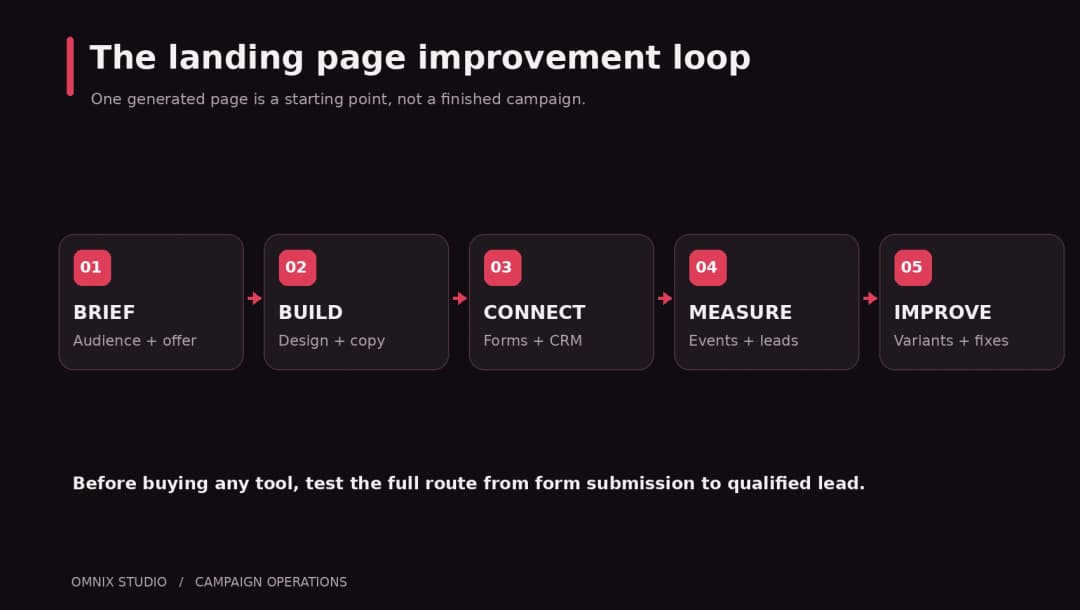
The features that look impressive in product demos are not always the ones that save money. A generated hero image rarely solves the campaign’s biggest risks. A functioning form-to-CRM connection, accurate conversion tracking, and a clear way to update offers can be worth more than another ten design templates.
1. Can the page actually capture and route a lead?
Test a complete submission, not merely the success message. Submit two contacts with different campaign parameters. Confirm that the email addresses arrive in the correct CRM audience, that deduplication and consent handling behave as expected, and that the conversion event is fired once. A ‘connected’ integration badge is not a substitute for an end-to-end test.
2. Can you test the right hypothesis?
A/B testing is useful when the change is tied to a question: will showing the demo video before the form increase qualified demo requests? Testing a random button color without a hypothesis usually produces little usable learning. Watch for platforms where experimentation requires a higher tier, extra product, or a separate measurement tool.
3. Does the page follow the ad promise?
Google Ads says landing-page experience is connected to relevance and usefulness. If an ad promises a free 20-minute assessment and the page leads with a paid annual contract, the mismatch is not fixed by AI copy. Keep the ad, headline, offer conditions, and primary CTA aligned. Source: Google Ads landing-page guidance.
4. Can you maintain a dozen versions without mistakes?
Ask how reusable sections work, what happens when a privacy-policy link changes, and whether you can roll back an accidental edit. Multi-client agencies should inspect workspace permissions and page ownership carefully.
5. Does mobile performance survive the marketing stack?
Test the actual published page with realistic images, consent banners, analytics scripts, and form providers. Do not infer speed from an empty template. Avoid publishing generated testimonials, inflated claims, or placeholder ‘Trusted by’ logos.
How to Choose Based on Your Goal
You need a polished SaaS launch page
Start with Framer. Consider Webflow when the marketing site has more complex content systems, editing governance, or many related pages. A custom build can become worthwhile if the launch page contains interactive product demonstrations, unusual application logic, or strict infrastructure constraints.
You run Google or Meta ads and need measurable results
Shortlist Unbounce and Instapage, then include Leadpages if the lead-gen workflow is straightforward. The critical test is not which editor feels faster; it is whether you can launch distinct ad-to-page messages, collect valid leads, and trace those leads to business outcomes.
You manage campaigns for multiple clients
Look closely at Landingi and Instapage. Evaluate client separation, reusable page systems, permissions, branding, integrations, and export/migration options. A cheap per-page starting price can become expensive if reporting or organization is difficult.
You need one page for a new service business
Consider Leadpages for focused lead capture and Wix if the page is part of a complete small-business site. Avoid buying an enterprise experiment tool for a page that receives 200 visits a month unless you have a specific reason.
You already have a WordPress website
Before moving your campaign into a new hosted page builder, evaluate whether your existing WordPress stack can achieve the goal with a performance-conscious landing page, forms, CRM automation, and analytics. The best move is not automatically the newest AI editor. A separate campaign subdomain can complicate branding, SEO, tracking, and maintenance. Omnix Studio works with WordPress and custom web development for precisely this kind of tradeoff.
A Practical Evaluation: Give Every Builder the Same Brief
To choose fairly, run a small pilot with the same landing-page brief instead of comparing vendor demos made by different marketing teams. Here is a reusable example:
Create a landing page for a B2B SaaS product that schedules and follows up after sales calls. Audience: operations leads at 10–100-person businesses. Offer: a 20-minute product demo, not a free trial. Include a headline that matches the ad, three clear benefits, genuine proof placeholders that we will replace, an accessible demo request form, a privacy disclosure, a mobile layout, and one main CTA. Carry UTM values into the form submission and show an accessible success state.
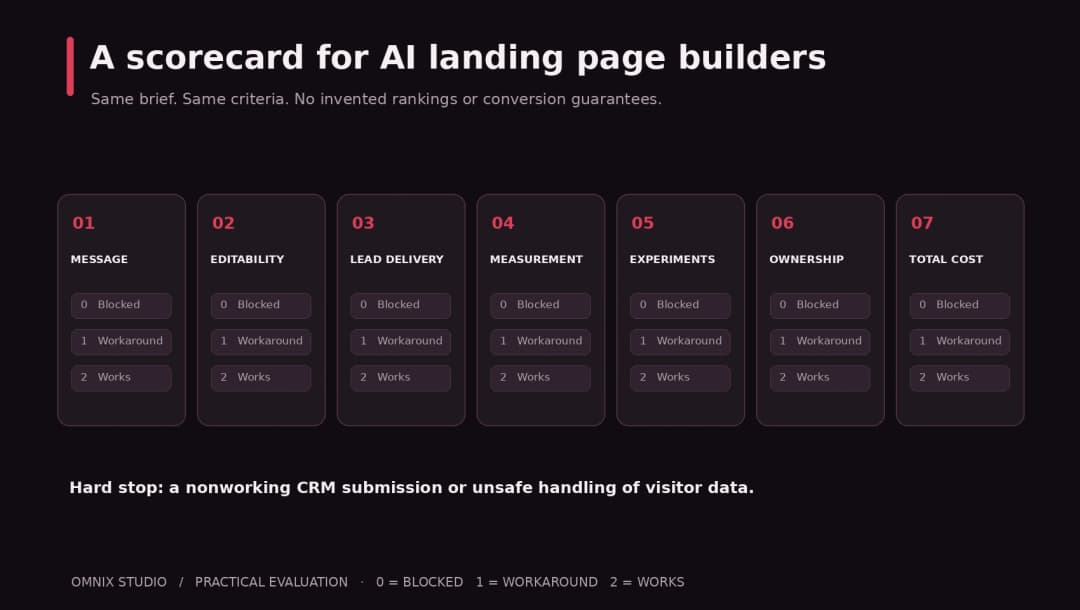
Then assess each platform against a fixed checklist:
- Message and structure: Does the page quickly explain who it helps, what it does, and what happens after the CTA?
- Editability: Can the marketer change copy, spacing, and mobile layout without breaking reusable components?
- Lead delivery: Does a real submission reach the CRM with consent and attribution intact?
- Measurement: Can the team distinguish page visits, form attempts, valid leads, and qualified leads?
- Testing: Can you run a controlled variant and keep its results separate from unrelated traffic?
- Ownership: Can your team retain content, export leads, manage domains, and migrate if required?
- Cost: What does the plan cost after adding domain, testing, AI credits, team seats, traffic, and integrations?
Score each criterion from 0 (cannot complete) to 2 (usable without workaround). Treat a missing security or lead-delivery requirement as a blocker even if the overall sum looks high. We have not run this controlled test across the seven vendors, so the article intentionally makes no numeric ‘winner’ claims.
What About Pricing?
Do not compare landing-page tools using only the cheapest advertised monthly price. Some platforms price the website, others the marketing campaign, and others the volume of optimization, hosted traffic, experiments, team members, or AI usage.
Model two budgets. Build-month budget: subscription, design effort, paid assets, integrations, custom domain, and testing setup. Operating-month budget: hosting or visitor allowance, analytics and experimentation, CRM automation, maintenance, translation/localization, and the person who will make changes.
For example, a low-fee page that needs a separate testing product and a developer every week can be more expensive than a dedicated platform. Conversely, a premium conversion suite may be a poor purchase for a solo founder running a low-traffic waitlist. Verify the official vendor pricing and entitlements on the purchase date. We have intentionally left fluctuating 2026 figures out of this editorial comparison rather than publishing outdated prices.
AI Can Build the First Page. It Cannot Validate Your Offer.
The greatest risk with AI landing pages is false confidence. The layout looks professional. The hero copy follows common formulas. The trust badges sit in exactly the right places. None of that proves the offer is clear or that the right audience wants it.
Review AI output with the person who understands the business. Replace generic claims with evidence you have permission to publish. Check disclaimers and pricing details. Use truthful testimonials and genuine logos. Confirm that the form works with keyboard navigation, that the labels are clear, and that your privacy notice matches the data you actually collect.
Then observe what visitors do. If no one clicks the CTA, investigate relevance and hierarchy. If everyone opens the form but few submit, investigate friction. If plenty submit but none qualify, the issue may be audience targeting or offer framing. A builder can accelerate experimentation; it cannot decide business strategy for you.
Our Final Recommendation
If we had to narrow the field by use case rather than crown a universal winner, we would put Framer first for a design-led launch page, Webflow for an established marketing-site system, Unbounce for dedicated ad campaign optimization, Leadpages for direct lead generation, Instapage for high-volume ad-to-page operations, Landingi for repeatable agency campaign workflows, and Wix for small businesses that need a whole website around the page.
You might also need none of them. If the existing WordPress or custom website already has working forms, analytics, and a reliable way to build pages, improving the offer and conversion tracking may create more value than migrating to a new AI builder.
At Omnix Studio, we help teams plan and build landing pages as part of a broader design and development workflow. That includes landing page design, website UX, custom websites, and WordPress development. If your first AI draft needs clearer messaging, real integrations, or a maintainable launch experience, our team can help turn it into a page you are comfortable sending traffic to.
For adjacent reading, see our existing guide to AI design tools and our AI frontend tools comparison. We will link to the October landing-page design best-practices article once it is published and its permalink is confirmed.
Frequently Asked Questions
What is the best AI landing page builder for beginners?
For focused lead generation, Leadpages is an approachable shortlist candidate; for a full small-business website with occasional campaign pages, Wix is worth comparing. Check plan-specific form, domain, and testing features before purchasing.
Which AI landing page builder is best for SaaS?
Framer is useful for highly visual SaaS marketing pages; Webflow is attractive when the brand has larger content and design-system requirements. If the SaaS page must run within an existing application or infrastructure, compare a custom implementation.
Can AI-generated landing pages improve conversion rates?
They can help teams create and test variants faster, but generation alone does not guarantee more leads or sales. Conversion outcomes depend on audience relevance, offer, credibility, user experience, form behavior, and measurement quality.
Is Unbounce better than Framer?
For a paid-search campaign that needs dedicated experiments and visitor routing, Unbounce may be a better fit. For a design-led startup site with visual control and broad publishing needs, Framer may be more natural. Neither is universally better.
Does Webflow’s AI builder work on every existing Webflow website?
No. Its current help center restricts the main AI site-builder workflow to newly created AI sites or sites originally created with that builder. Other Webflow AI features may be usable in different contexts, depending on eligibility.
Does Instapage generate full landing pages from prompts?
Instapage documents a Prompt-to-Page feature, but states that it is rolling out gradually. Verify access in your account rather than assuming every plan has it.
Can I build an AI landing page on WordPress?
Yes. AI can assist with structure, copy, design drafts, and even code, while WordPress handles publication and ongoing content management. Compare total workflow quality before moving your domain or analytics into another hosted platform.
What should I test before publishing an AI landing page?
At minimum: mobile responsiveness, actual form delivery, UTM attribution, conversion events, keyboard accessibility, genuine social proof, privacy disclosures, page speed with real scripts, and whether the headline delivers on the ad promise.
Editorial Sources and Verification
The comparison above draws on official documentation and vendor pages, checked October 13, 2026. See Research-and-Sources/research-source-log.md for a claim-by-claim audit, links, rollout restrictions, and pending verification tasks. No hands-on benchmark, CRO uplift experiment, or speed ranking has been claimed.