A practical, research-backed guide from Omnix Studio · Updated October 13, 2026
A landing page can look expensive and still fail at the one job it was built to do. The photography is sharp. The animation is smooth. The button is a beautiful shade of red. Then someone arrives from an ad for a specific problem and sees a vague headline, three competing calls to action, and a form asking for their phone number before explaining what happens next.
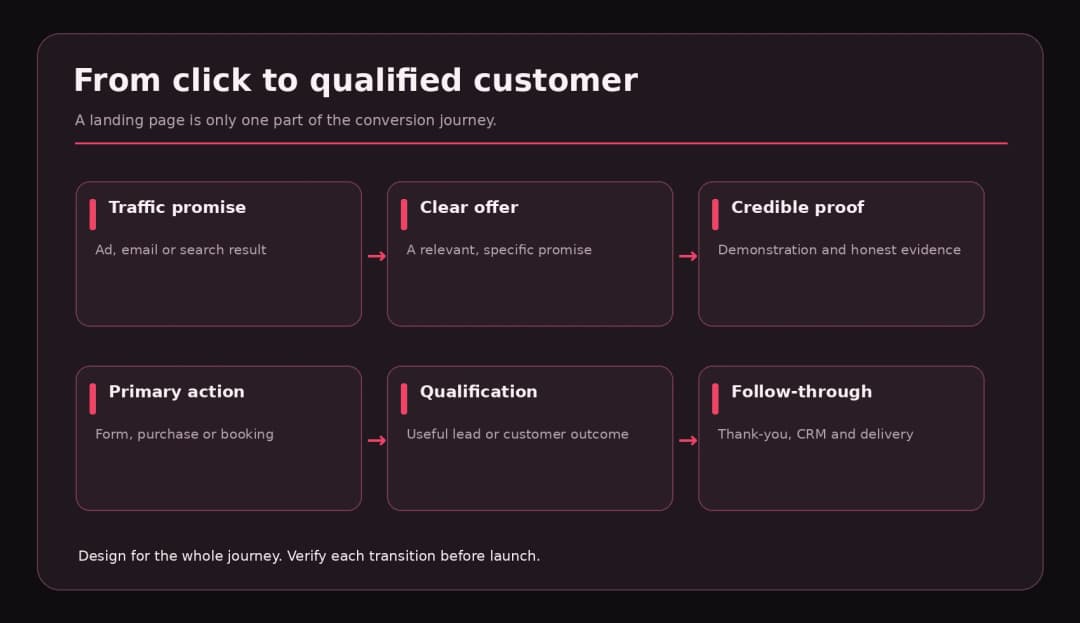
That is not a traffic problem. It is a decision problem. The page makes visitors work too hard to decide whether the offer is for them and what it will cost to act.
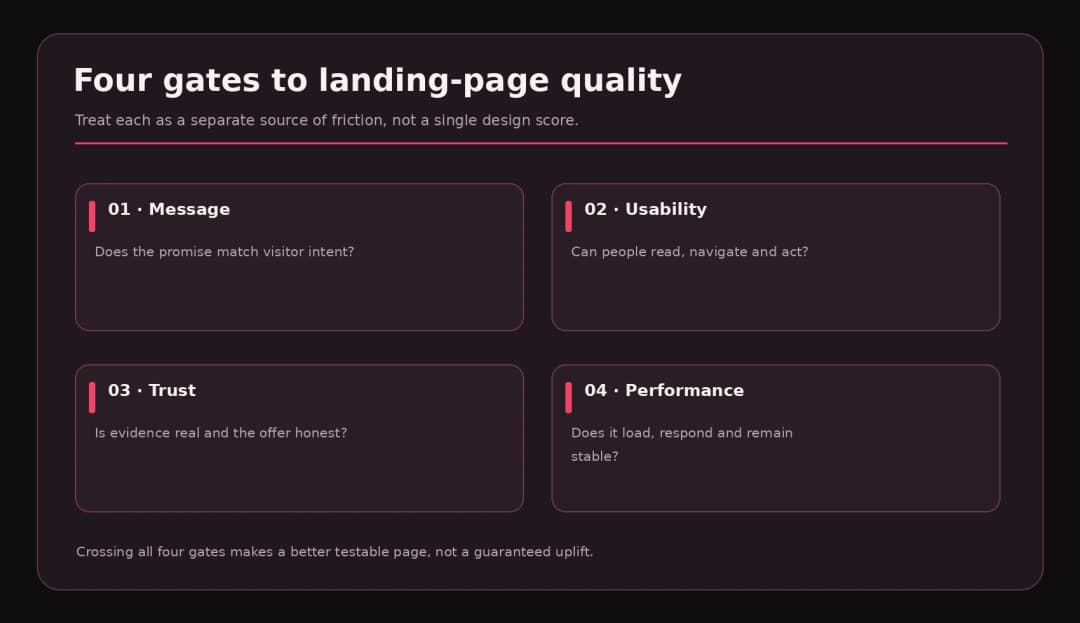
Good landing page design is not simply making a page shorter, removing the navigation, or choosing the loudest button color. It is aligning the visitor’s expectation with a credible offer and a clear next step. The fifteen practices below explain how to do that, when each one matters, and what to measure after you make a change.
A research note: Design practices improve the conditions for conversion, but no individual tactic guarantees a lift. Every example in this guide is illustrative unless it is explicitly attributed to a published study. The worked redesign is a fictional B2B software page, not a reported client experiment.
Key Takeaways
- Start by matching the page to the audience and the promise made in the ad, email, or search result.
- Make the offer understandable in the headline and visible first section. Cleverness is not a substitute for clarity.
- Use one primary conversion goal, but repeat the same relevant CTA where visitors make decisions.
- Put proof beside the claim it supports; a wall of anonymous testimonials is not a trust strategy.
- Ask only for the information needed at that stage, while keeping labels, errors, and privacy expectations clear.
- Design for mobile, keyboard navigation, readable contrast, and real loading conditions.
- Measure qualified conversions and downstream outcomes, not just raw button clicks.
First, Decide What Counts as a Conversion
A conversion can be a purchase, trial signup, consultation booking, demo request, waitlist join, or lead-magnet download. The page’s visual hierarchy should follow that choice. A low-risk template download can justify a shorter page. An enterprise software demo often needs more evidence, pricing context, integrations, security information, and a clear explanation of the sales conversation.
Define one primary action, a visitor segment, and the traffic source. Then identify a secondary measure of lead quality. For a demo page, for example, the primary event might be a successfully scheduled meeting; the quality measure might be the share of scheduled meetings that fit your target customer profile.
Conversion rate = completed primary actions ÷ eligible landing-page sessions × 100. Be consistent about sessions versus users, bot filtering, consent-related measurement gaps, and what counts as a completed action. A form-start event is not a submitted lead.
Unbounce’s 2024 conversion benchmark reports a 6.6% median across the industries and landing pages in its sample. That is a useful point of context, not a universal standard for your own page. Traffic mix, offer, attribution, and industry can make two apparently similar conversion rates incomparable. [1]
1. Match the Headline to the Visitor’s Reason for Clicking
If an ad says “Automate client onboarding for accounting firms,” a landing page headed “The Future of Work Starts Here” forces the visitor to reconnect the dots. Use language that echoes the actual problem, audience, or outcome they were looking for. Google Ads explicitly identifies information relevance, usefulness, navigation, and the expectations set by the ad as elements of landing-page experience. [2]
A better opening for that example: “Collect documents, approvals, and signatures in one client onboarding workflow.” The second line can explain who it serves and what it connects with. That is more useful than repeating the product’s name three times.
Try this: Read the ad and the page header back-to-back with the logo hidden. Would a first-time visitor recognize them as part of the same promise? If not, fix the mismatch before debating button colors.
2. State the Offer, Audience, and Outcome Immediately
Visitors should be able to answer three questions without scrolling: What is this? Is it for me? What happens when I act? A good hero normally communicates those answers through a headline, supportive sentence, and primary action, with a visual that explains the product rather than merely decorating the page.
Nielsen Norman Group’s work on perceived value emphasizes that people form judgments about a site’s usefulness from the initial impression. A polished surface cannot compensate for an unclear match to the visitor’s goal. [3]
Avoid absolutes such as “the world’s best platform” unless the claim has a meaningful, supportable basis. Replace them with concrete capabilities: “Generate a branded proposal, send it for approval, and track the response without spreadsheets.” The claim should still match the product you actually sell.
3. Give the Page One Primary Job
A landing page is not a miniature homepage. An overloaded hero offering Start free trial, Book a demo, Watch the webinar, Read the blog, and Meet the team divides attention before the offer has been understood.
Choose one high-emphasis action for the audience and campaign. A lower-emphasis secondary action can be appropriate when people genuinely need another route, such as Watch a 90-second demo. The key is hierarchy: the primary action should not compete with five equally loud buttons.
Design exercise: Label every clickable item above the fold as primary, supporting, or distraction. Remove or de-emphasize the distractions. If sales requires a phone number and product requires trial signup, build separate audience-specific pages rather than forcing two different journeys into one hero.
4. Write CTA Copy That Describes the Next Step
“Submit” describes what a browser form does. “Get the pricing guide” describes what the visitor receives. “Book a 20-minute walkthrough” makes the commitment understandable. CTA language should be short and accurate, not artificially urgent.
The surrounding text matters as much as the label. A button that says “Start free trial” may need a note explaining whether a credit card is required and what happens when the trial ends. A booking button may need a note about the call length and whether it is a sales conversation. Do not promise “No credit card required” or “Cancel anytime” unless your actual checkout or terms support it.
Repeating the same CTA after a proof section or pricing explanation can help people act when they are ready. Repeated buttons are not inherently competing goals when they lead to the same action.
5. Build a Visual Hierarchy Around the Decision
Your eye should encounter the headline, offer, evidence, and next step in a sensible order. This is not always a neat F-shaped pattern or a fixed left-to-right formula. It is a deliberate reading route tuned to the design and viewport.
Use typography, whitespace, alignment, grouping, and contrast to make priorities legible. One large heading can establish hierarchy. Reducing spacing between related benefit and proof elements helps them read as a unit. Give secondary decoration less visual weight than the CTA.
Run the blur test: reduce the page screenshot until individual words are unreadable. Can you still identify the headline area, primary action, and proof? If every component screams equally, the hierarchy needs work.
6. Show the Product or Outcome, Not a Generic Mood
An image of a smiling meeting room can support a human story, but it may not help someone understand accounting automation. Use genuine product screenshots, an annotated workflow, a clear service illustration, a product-in-context image, or a short demonstration when the visuals answer a relevant question.
For software, show enough of the interface to prove the workflow exists. If the interface contains a complex dashboard, crop to the action that supports your claim and add a caption. For a web design service, use an authentic project result only with permission and avoid inventing client outcomes.
Stock photography, illustrations, and AI-generated artwork can still be useful for mood and branding. They should not masquerade as actual customer or product evidence.
7. Put Trust Evidence Beside Specific Claims
A testimonial is most useful when it addresses a concern the visitor actually has. If the claim is “Our onboarding process takes less manual follow-up,” show a credible customer explanation of the workflow, not five anonymous stars from unrelated users.
Match evidence to the decision. Use product demonstrations to prove functionality, recognizable customer names with permission to establish adoption, case studies with methodology to show results, and plain-language policies to explain risk. If you share performance numbers, state what period and population they cover. Do not invent approval badges, company logos, review counts, or endorsements.
For a new business without dozens of testimonials, provide transparent deliverables, team expertise, sample work, realistic timelines, and direct contact options. Honest specificity beats fabricated social proof.
8. Reduce Form Friction Without Destroying Lead Quality
A lower field count can make a form easier, but the shortest possible form is not automatically the best. A demo form may need company name or platform context for routing. Ask for what is needed to deliver the promised next step; gather more in a later conversation when appropriate.
Baymard’s checkout research found that the number of form fields users must handle can matter more than the number of formal checkout steps. That evidence comes from ecommerce checkout, not a controlled test of every lead form, so it is a useful design principle rather than a universal conversion promise. [4]
Keep visible labels, identify required and optional inputs, preserve autofill, use appropriate input types, and provide specific inline errors. Explain why sensitive fields are requested. If a visitor submits a valid form, show a confirmation with the next step instead of leaving them guessing.
Form review: Is a phone number genuinely required to send a PDF? Does the error explain the problem? Can someone complete the form without a mouse? Is the privacy link visible? Do form submissions reach the destination team reliably?
9. Make Mobile the First Real Design Review
A desktop mockup can hide the problems that surface on a smaller device: a fixed CTA covering the form, a testimonial slider that swallows the page, text wrapped into narrow columns, and images that push the actual offer far below the fold.
Start testing at common narrow widths, not only a single phone preset. Check touch target spacing, browser zoom, system text enlargement, portrait/landscape, virtual keyboard states, and actual midrange device performance. The layout should preserve the same core message when columns collapse.
If you use a sticky mobile CTA, reserve enough space so it does not hide the last form field or the confirmation message. A floating button that obscures a legally necessary disclaimer creates another problem while trying to solve one.

10. Make the Page Fast Enough to Feel Dependable
Landing pages often collect scripts from advertising platforms, analytics, chat widgets, booking embeds, animation packages, and video players. Those pieces compete for time on the device’s main thread. A beautiful hero that arrives late does not create a good initial experience.
Google’s Core Web Vitals focus on loading, responsiveness, and stability. Its current good-experience thresholds are Largest Contentful Paint (LCP) no more than 2.5 seconds, Interaction to Next Paint (INP) no more than 200 ms, and Cumulative Layout Shift (CLS) no more than 0.1, evaluated at the 75th percentile of real page loads. [5]
Compress and size images appropriately, prioritize the actual hero asset, remove unnecessary scripts, reserve dimensions for media, and avoid heavy effects over essential content. Use PageSpeed Insights for field data where available and Lighthouse for lab diagnostics. A perfect Lighthouse score is not evidence of a great offer, and a fast page alone cannot fix weak positioning.
11. Meet Accessibility Requirements Before Testing Button Colors
Accessibility should not be treated as a final decorative check. If someone cannot read the text, operate the form by keyboard, perceive the focus indicator, or understand an error, your funnel is effectively closed to that visitor.
WCAG 2.2 Level AA calls for at least 4.5:1 contrast for normal-sized text and 3:1 for qualifying large text, with specified exceptions. [6] Use actual contrast testing for text, form labels, buttons, and link states rather than assuming black and red automatically meet the ratios.
Use semantic headings, labels tied to controls, alt text for informative images, meaningful focus order, descriptive errors, and visible feedback. Don’t rely on a red outline alone to explain that a field is invalid. Accessibility and conversion are not rivals: usable controls help people complete the action the page exists to support.
12. Answer Objections in the Order They Arise
Visitors hesitate for different reasons. Early on they ask “Is this relevant?” Later they ask “Will it work for me?”, “Can I trust it?”, and “What happens after I click?” Structure the page accordingly.
For a short consumer offer, the answer might be price, shipping, and returns. For an agency landing page, it may be project scope, ownership of deliverables, typical collaboration process, and contact expectations. For software, it may be integrations, data protection, implementation effort, and cancellation terms.
Use concise sections, FAQs, pricing explanations, and annotated proof at the point where each question becomes important. Resist turning every landing page into a giant wall of persuasion. Length should follow the complexity of the commitment, not a blanket rule that shorter always wins.
13. Use Genuine Urgency Only When the Offer Justifies It
Countdown timers, limited seats, and offer-end warnings can focus attention when they reflect something real. A perpetual timer that restarts for every visitor creates a misleading signal and can damage trust.
State actual limitations: “Registration closes October 30” if the event really closes then, or “Only 20 onboarding slots this month” if capacity has been verified. If the offer has no meaningful deadline, do not invent one. Use clear availability and process information instead.
A trustworthy page may convert fewer impulse clicks but attract more qualified prospects. Measure what happens after the first click, not just the emotional response to a countdown.
14. Measure the Full Journey, Then Test One Clear Hypothesis
Instrumentation should distinguish impressions, scroll engagement, CTA interaction, form starts, submission success, scheduled meetings, and qualified outcomes. If the same conversion fires twice on page refresh, every optimization decision downstream becomes suspect.
Formulate a hypothesis around a problem: “Visitors arriving from the accounting-ad campaign don’t recognize the offer because the hero uses generic language. Rewriting it to name accounting onboarding will increase qualified demo requests.” Identify the primary metric, any guardrail such as lead quality, and how you will run the experiment.
Avoid comparing a week of paid social traffic with a holiday week of branded search and crediting the redesign for the difference. Randomized A/B testing is helpful when sufficient traffic exists; for smaller teams, run careful usability sessions and inspect funnel diagnostics before declaring a winner. Do not confuse correlation with causation.
15. Design the Post-Conversion Experience Too
The landing page’s job does not end when a button is clicked. A user who requests a brochure and receives nothing, or books a demo and never gets confirmation, has technically converted but experienced a broken promise.
Test your thank-you state, email delivery, booking calendar, CRM assignment, lead notifications, and fallback behavior. If the visitor made a purchase, show accurate payment status and next steps. If they requested a conversation, explain when and how they will hear from you without overpromising response times.
For WordPress-based lead capture, test the actual end-to-end form and automation workflow, not just the front-end validation. The same applies to headless and custom applications: a beautiful form is only as useful as the follow-up it triggers.
A Worked Example: Repairing a B2B SaaS Landing Page
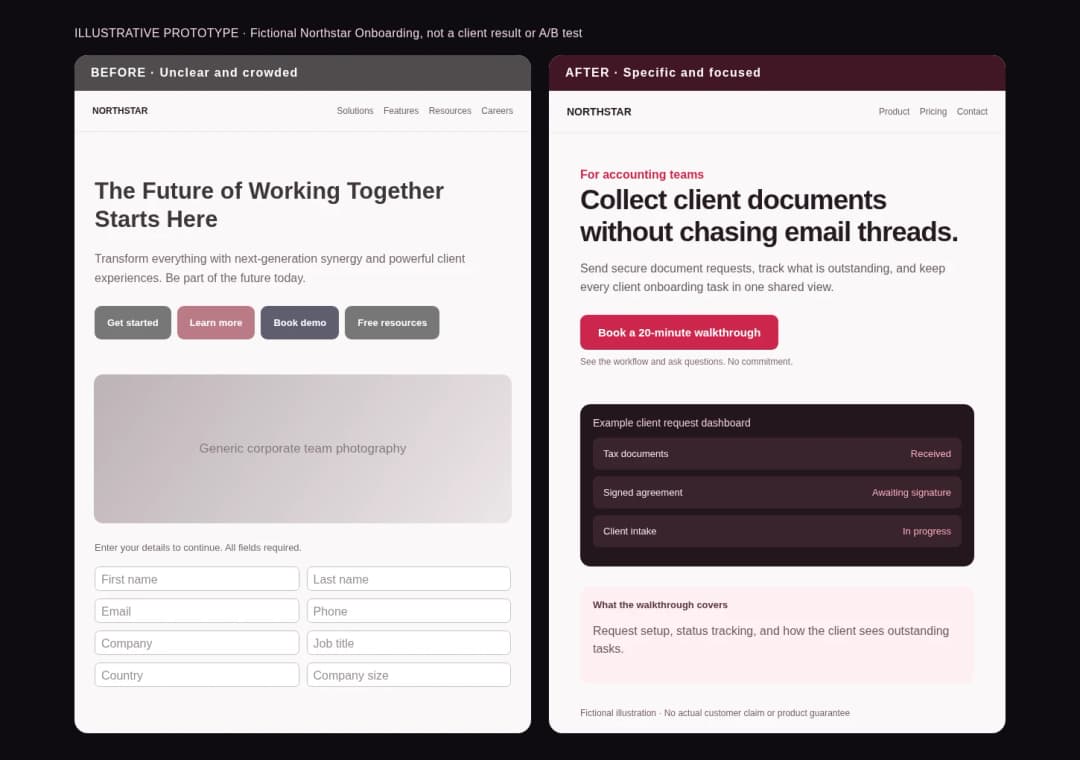
Imagine Northstar Onboarding, a fictional tool for small accounting firms. Its paid search ad promises to collect client documents automatically. The original page contains a generic headline, four equally bright buttons, an unrelated team photo, a nine-field lead form, and no explanation of what happens after the demo request.
The redesigned version makes a specific promise: “Collect client documents without chasing email threads.” A short subtitle states the audience. A UI illustration shows an upload request and status tracker. The primary CTA reads “Book a 20-minute walkthrough.” Near the form, a note says what the meeting covers. Testimonials are left out because this fictional product has no real customers to quote. Instead, a workflow panel and a transparent capabilities section provide legitimate information.
This is an illustrative prototype, not a live A/B test. We cannot claim that the redesign increased conversion. What we can say is that it addresses identifiable issues: message mismatch, unclear hierarchy, competing actions, excessive input, and a weak explanation of the next step. The accompanying before/after screenshots are browser captures of our original example, not screenshots of a real company’s website.
What We Would Measure
| Event | Why it matters | Guardrail |
|---|---|---|
| Landing sessions by campaign | Keeps traffic sources comparable | Exclude internal/bot sessions where possible |
| Hero CTA click rate | Checks whether visitors see the action | Do not treat a click as a lead |
| Form completion rate | Checks form usability | Monitor validation errors |
| Successful demo bookings | Measures the primary conversion | Remove duplicates and cancellations |
| Qualified demo rate | Checks whether the copy attracts suitable buyers | Define qualification before testing |
| Show-up and follow-up rate | Checks promise delivery | Monitor calendar and CRM delivery |
Use the responsive HTML version of this table in the publishing package; it retains Omnix Studio’s dark charcoal header and deep red accents.
A Landing Page Review Checklist You Can Reuse
Before launch, ask the owner of each element to prove it works. Do not check a box simply because a Figma frame looks complete.
- Message: The headline mirrors visitor intent; the offer and audience are explicit; the CTA says what happens.
- Structure: One primary action; clear hierarchy; supporting proof near relevant claims; fewer distractions.
- Trust: No invented testimonials, badges, awards, urgency, or unsupported statistics; pricing and terms are accurate.
- Forms: Only justified fields; clear labels and validation; accessible keyboard operation; honest privacy notice.
- Mobile and accessibility: Responsive across narrow widths; visible focus; tested contrast; usable with text zoom.
- Performance: Images sized and compressed; core scripts justified; real-user metrics monitored when available.
- Measurement: Event definitions, conversion deduplication, lead qualification, and attribution documented.
- After the conversion: Thank-you page, email, booking, CRM assignment, and error recovery tested.
The package includes this checklist as an editable CSV, with owner, priority, status, and evidence fields so a team can use it during a real launch.
A Practical 30-Day Improvement Plan
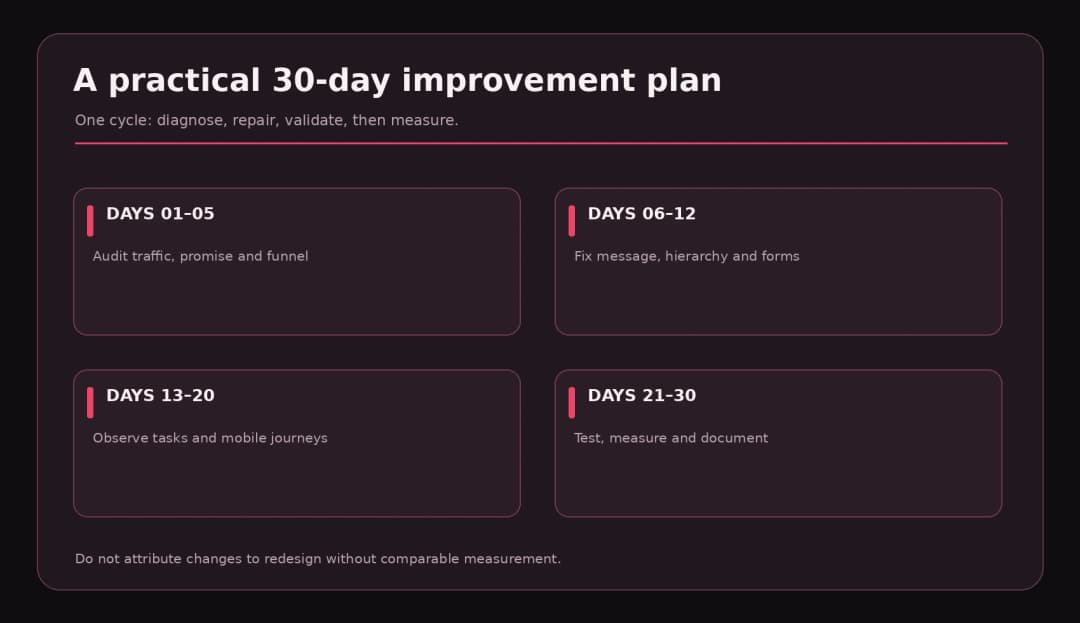
Days 1–5: Diagnose. Audit message match by traffic source, inspect device-level analytics, watch selected anonymous session recordings if consent and privacy controls permit, and run basic accessibility and performance checks. Separate observations from guesses.
Days 6–12: Fix the biggest friction. Rewrite mismatched headlines, simplify competing calls to action, repair broken forms, improve error messages, and explain the post-submit journey. Make sure measurement isn’t double-firing.
Days 13–20: Validate with people. Run five or more moderated tasks as a discovery exercise when feasible, with participants similar to the intended audience. Look for recurring confusion, not statistically representative percentages. Pair qualitative findings with relevant funnel data.
Days 21–30: Experiment and monitor. Prioritize one clear hypothesis; test if the traffic supports a meaningful evaluation. Monitor conversions, qualified leads, performance regressions, and downstream follow-up. Document what changed and what you learned, including inconclusive results.
Frequently Asked Questions
What makes a landing page high converting?
A strong page aligns with the visitor’s expectation, communicates a relevant offer, supports claims with evidence, removes unnecessary effort, and has a dependable post-conversion workflow. Conversion rate also depends on the offer and audience, so design alone cannot determine the result.
Should a landing page have a navigation menu?
Not always. A campaign-specific page often benefits from fewer exits, but some offers require navigation to trust, terms, pricing, or product details. Remove unnecessary options without hiding information people need to make a confident decision.
Should CTAs be above the fold?
A clear first action is often useful, but the phrase above the fold is not a universal pixel location. Screen sizes vary and complex offers may need explanation. Place a visible primary CTA early and repeat the same action where it logically follows proof or pricing.
How many form fields should a landing page have?
As few as are needed to deliver and qualify that specific offer. A two-field newsletter form and a business demo request serve different purposes. Measure form completion, lead quality, and operational requirements rather than following a fixed field-count rule.
Does landing page speed affect conversions?
Slow or unstable experiences can make the journey more frustrating, but the size of any conversion improvement must be measured in your own audience. Core Web Vitals provide useful technical thresholds, not a conversion guarantee.
Can AI design tools build a landing page that converts?
They can speed up layout, copy exploration, and production, but they cannot independently validate market-message fit, truthfulness of claims, customer evidence, or the reliability of your CRM follow-up. Treat AI-generated pages as drafts that need testing and editorial review.
The Better Landing Page Is the One People Can Understand and Use
A landing page is an agreement between a promise and an action. The design should make that agreement easy to understand, credible enough to trust, and simple enough to complete. Start with message and offer; make evidence and forms work; protect the mobile experience; then measure the full journey.
If your team needs a sharper landing page, clearer product positioning, a practical UX audit, or WordPress and custom web development support, explore Omnix Studio’s design and development services. For the tool selection side, see our existing guide to AI prototyping tools.
Research and Sources
[1] Unbounce, Conversion Benchmark Report (2024 sample): https://unbounce.com/conversion-benchmark-report/ — Reports a 6.6% median across its included landing pages and industries. Do not generalize to all businesses.
[2] Google Ads Help, Landing page: https://support.google.com/google-ads/answer/14086 — Official explanation of landing-page experience and relevance.
[3] Nielsen Norman Group, Perceived Value in User Interfaces: https://www.nngroup.com/articles/perceived-value/ — Research context on initial impressions and perceived utility.
[4] Baymard Institute, Checkout Optimization: 5 Ways to Minimize Form Fields (June 2024): https://baymard.com/research-articles/checkout-flow-average-form-fields — Scope limited to checkout UX; used only as qualified analogy for lead-form friction.
[5] web.dev, Web Vitals: https://web.dev/articles/vitals — Official Core Web Vitals measures and current thresholds.
[6] W3C WAI, Understanding WCAG 2.2: Contrast (Minimum): https://www.w3.org/WAI/WCAG22/Understanding/contrast-minimum — WCAG AA contrast requirements.
[7] Google Search Central, Understanding Page Experience: https://developers.google.com/search/docs/appearance/page-experience — Performance matters but isn’t an SEO magic bullet.
Editorial disclosure: Recommendations reflect documented UX principles and practical editorial judgment. No A/B test or client uplift claim was made. The fictional redesign is a design demonstration only. Verify tool policies, website links, and image licensing again before publication.