Omnix Studio editorial guide | Research reviewed October 14, 2026 | Audience: creative, marketing, SEO, and web agencies. All budgets and fictional project examples are illustrative, not vendor quotes or client case studies.
A client wants a custom WordPress site. Your agency owns the strategy, brand, and relationship, but your developers are booked for the next eight weeks. You have three choices: turn the project down, hire permanently for an uncertain pipeline, or bring in a development partner who works behind your brand.
The third option can be excellent. It can also be expensive in ways that never appear on a supplier rate card. An offshore rate does not tell you whether a team can ship accessible Gutenberg layouts, handle plugin conflicts, respect an NDA, document a release, or fix an urgent regression without speaking directly to your client.
Hiring a white label WordPress development agency is an exercise in reducing delivery risk, not simply shopping for the lowest hourly rate. This guide gives agency owners a repeatable way to define the work, shortlist providers, run a paid test, compare proposals, set contractual boundaries, and launch confidently.
Key Takeaways
- Choose a partner against a written WordPress delivery scope, not a generic agency portfolio.
- Audit real artifacts: version-controlled code, staging environments, QA records, launch documentation, and evidence of editor usability.
- Agree who controls client communication, repository access, hosting, domain, licenses, and support before kickoff.
- Compare total cost of delivery, including review, rework, project management, contingency, and support, rather than developer hourly rate alone.
- A small paid pilot with acceptance criteria is a better signal than a polished discovery call. Use approved test data and no production credentials.
- Include performance, accessibility, security, migrations, and content-editor experience in your definition of done.
- Establish an escalation path, rollback plan, and postlaunch responsibility before the first launch.
What Is a White Label WordPress Development Agency?
A white label WordPress development agency builds or maintains WordPress websites, themes, plugins, integrations, and related infrastructure for another agency. The customer-facing agency owns the commercial relationship and presents the work as part of its own service. The delivery partner generally operates behind the scenes under agreed communication and confidentiality rules.
That arrangement can cover a single landing page, an entire corporate site, a WooCommerce storefront, a custom plugin, an accessibility remediation project, or ongoing maintenance. The important distinction is not the technology. It is who sells the engagement, who performs the work, and who remains accountable to the client.
White label is different from simply referring a customer. In a referral, you normally introduce the customer to another provider and step away or share responsibility under a different agreement. In a white label engagement, your agency remains the client’s primary contact. It is also different from staff augmentation: a supplier may provide developers for your team, but a white label production partner can additionally own project planning, code reviews, QA, and handoff deliverables.
When Should an Agency Outsource WordPress Development?
There is no universal threshold such as “outsource after five projects per month.” The relevant signal is a persistent mismatch between promised delivery and internal capacity or expertise.
A white label partner is useful when: a designer has finished the UI but the agency lacks WordPress engineers; several retainers need simultaneous maintenance; a customer requests WooCommerce or membership functionality outside your normal stack; or a launch has a fixed deadline that cannot be met by your current team alone.
Keeping work in-house is often better when: the feature is strategically sensitive; the brief is still unstable; the client expects a particular named technical team; or the project requires privileged access to systems the customer will not authorize you to share.
A hybrid route is common: keep discovery, UX, content, SEO strategy, and client sign-off in-house while a partner handles implementation and technical QA. Whatever the split, document it. A promise of “full service” is not a substitute for a named accountable owner.
Step 1: Define the Project Before You Search
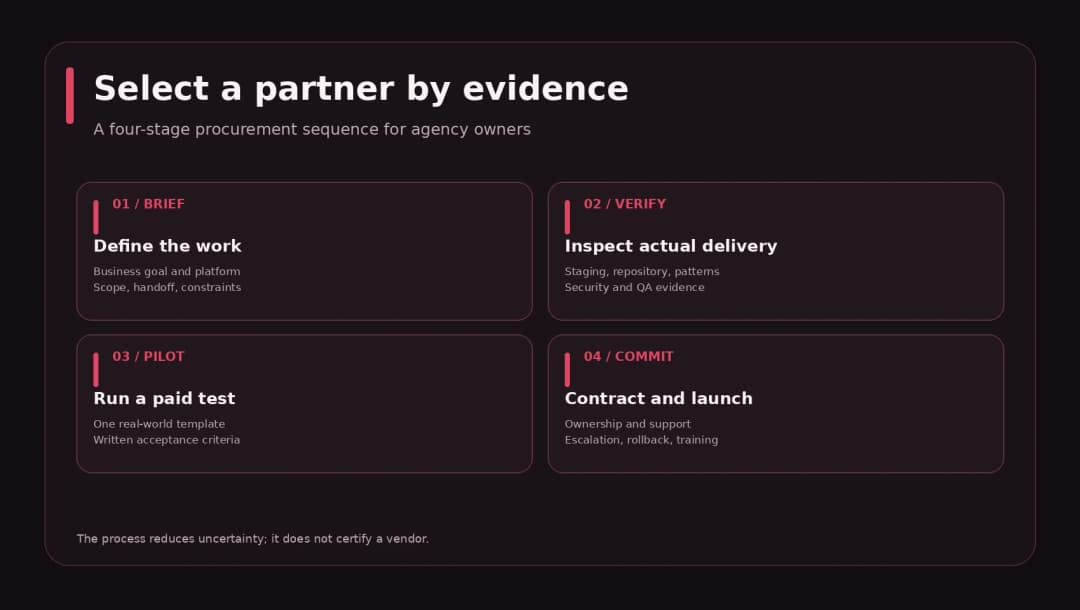
Begin with a one-page delivery brief. At minimum, capture the business goal, CMS and theme approach, content types, design source, integrations, editor requirements, timeline, hosting, testing, support, and explicit exclusions. Without these details, a supplier can give an attractive quote for a substantially smaller project than the one you expect.
Example brief: “Rebuild a 25-page B2B site in WordPress from approved Figma files. Use Gutenberg and a block-compatible theme; no heavy page builder. Keep existing URL slugs wherever practical. Create reusable service, testimonial, and case-study patterns. Integrate lead forms with the client’s CRM. Build on staging. Include basic training, 30 days of bug remediation, and a documented launch/rollback plan.”
That is already more useful than “need a fast WordPress website, please quote.” It gives candidates boundaries and exposes important questions: Who prepares the migration map? Who provides licensed fonts and premium plugins? Who checks consent? Will editors be able to create new service pages without a developer?
Keep “must-have” requirements separate from nice-to-haves. If the agency needs a custom WooCommerce checkout, list the shipping, tax, gateway, refund, and edge-case requirements explicitly. If the site is primarily content-led, avoid buying an elaborate custom platform that the client’s marketing team cannot maintain.
Step 2: Shortlist Agencies With Relevant WordPress Work
A beautiful portfolio can hide a fragile WordPress implementation. Ask for two or three examples close to your actual delivery pattern: editor-friendly marketing sites, complex integrations, high-volume WooCommerce, multilingual sites, or custom plugin work.
For each example, request an anonymized technical description: what the agency built, the team’s scope, the design-to-development workflow, major constraints, and how the site was tested. When client confidentiality prevents source access, ask for sanitized samples or a controlled demonstration project. Do not push a candidate to violate another client’s NDA.
Look for evidence of three things. First, continuity: can another developer understand the code and changes? Second, operational discipline: are staging, backups, and deployments repeatable? Third, editor experience: can the customer’s team perform normal content updates without breaking the layout?
A provider that only shows visual screenshots has supplied proof of design, not proof of engineering. That is not disqualifying, but it calls for deeper verification.
Step 3: Evaluate the WordPress Architecture
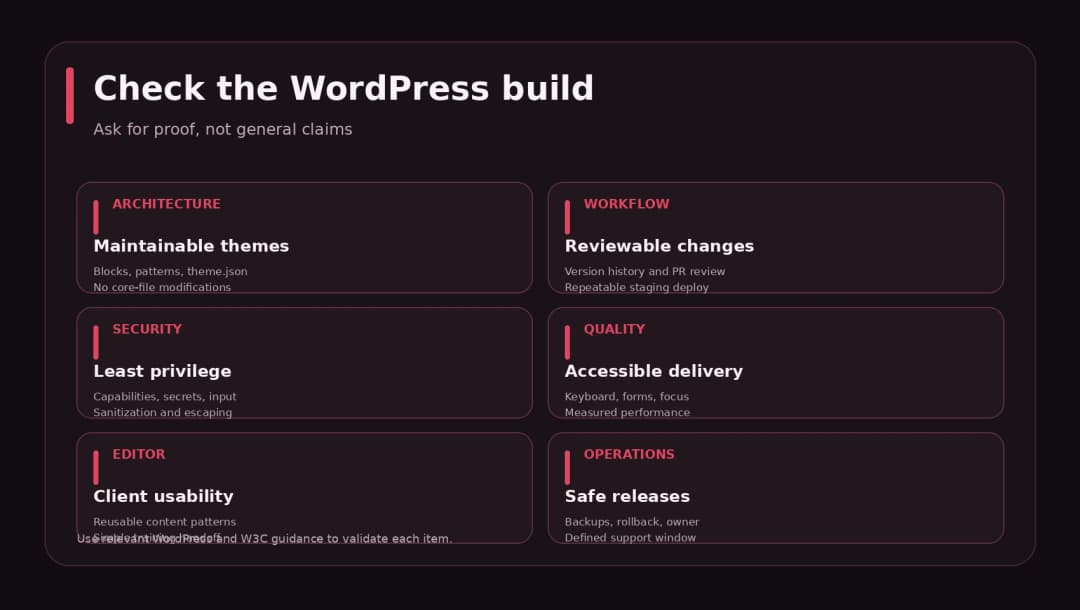
Ask how the team chooses between core blocks, patterns, a block theme, a classic theme, and custom blocks. A competent answer should fit the client rather than insist that every project use the same stack.
The WordPress Theme Handbook documents block themes and classic themes as distinct approaches. Block themes allow editing all site areas through the Site Editor, while the theme.json configuration supports global design settings such as typography, colors, spacing, and block controls. This is useful for agencies that want reusable layouts and an editor-friendly handoff. [1][2]
But Gutenberg is not a magic shortcut. A custom integration, dynamic filtering experience, advanced data model, or complex checkout may require bespoke development. Ask the partner where custom code lives, how dependencies are managed, and what changes remain portable if the agency changes vendors later.
Practical technical questions: Are changes tracked in Git? Do you use a staging environment and reviewable deployment path? Which PHP/WordPress versions are supported? How are secrets stored? What happens when a plugin update breaks a custom template? How do you decide whether functionality belongs in a plugin rather than a theme?
WordPress’s own Plugin Handbook cautions against editing WordPress core to add functionality because updates overwrite core changes. A partner should understand WordPress APIs and the difference between site presentation and business functionality. [3]
Step 4: Verify Security Practices Instead of Accepting “Secure by Default”
WordPress has secure development guidance, but using WordPress is not proof that an individual implementation is secure. Its Security API handbook emphasizes validation, sanitization, escaping output, and keeping code current. [4]
A meaningful supplier review covers least-privilege user accounts, separate development and production credentials, private repository access, a vulnerability response process, backup restoration, and the handling of third-party plugins. For custom forms and REST endpoints, authorization needs particular attention.
For example, WordPress documentation explicitly warns that nonces are not authentication or authorization and must not replace capabilities checks such as current_user_can(). A candidate who treats a nonce as complete protection for a privileged API endpoint needs further review. [5]
If the project involves sensitive customer data or financial information, expand the due-diligence scope with appropriate specialist review. The OWASP Application Security Verification Standard can inform security requirements in contracts, but a checklist alone is not a security audit or a guarantee. [6]
Evidence to request: a sanitized pull-request example, code review checklist, basic dependency audit approach, credential/access policy, and a short description of an incident response workflow. Do not request passwords, API keys, customer databases, or unredacted incidents during procurement.
Step 5: Check Accessibility, Performance, and Editor Usability
These are three different quality dimensions. A screenshot cannot prove any of them.
Accessibility: Ask for keyboard-navigation checks, visible focus indicators, form labeling and errors, semantic headings, meaningful alt text, and testing against an agreed WCAG 2.2 conformance target. WCAG 2.2 is a W3C Recommendation and includes testable success criteria grouped under perceivable, operable, understandable, and robust principles. [7]
Performance: Request reproducible measurements against agreed pages, devices, connection profiles, and a baseline. A 100/100 score from a single lab tool is not evidence of good real-user experience under every network condition. Teams should account for image sizes, caching, third-party scripts, hosting, and Core Web Vitals rather than claiming “fast by default.”
Editor usability: Ask someone unfamiliar with the implementation to create a page, replace a hero image, edit a testimonial, and publish a blog post in staging. A design can look excellent while being painful for a client to operate. Reusable blocks, controlled design tokens, sensible content fields, and a short training video can prevent recurring support tickets.
Treat these as explicit acceptance criteria in the agreement. Do not save them for a hurried review the day before launch.
Step 6: Choose a Collaboration Model That Protects Your Client Relationship
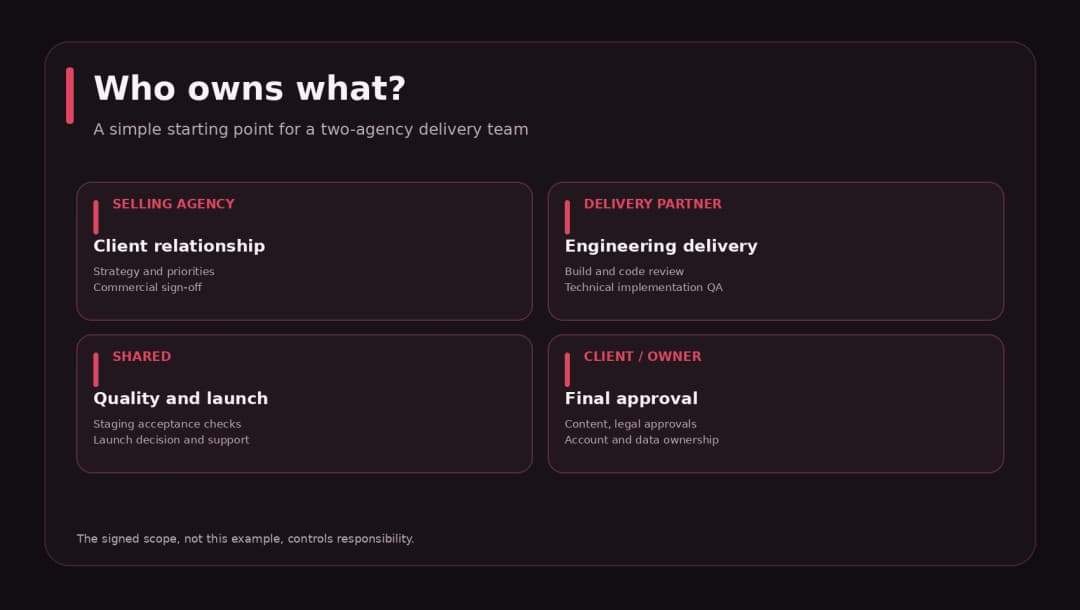
A white label relationship fails quickly when neither side knows who talks to whom. Define the communication rules before kickoff.
A common structure is that your agency owns client meetings, priorities, approvals, and commercial conversations; the partner owns implementation updates, technical estimates, code review, and technical QA. For complex projects, you may invite an engineer to a client call under your agreed identity and role. If that is allowed, document it; never misrepresent someone’s employment or credentials.
Decide the systems of record: where briefs live, where issues are tracked, where files and credentials are stored, and which channel handles urgent problems. Keep decisions in shared project records, not only direct messages. The two-agency setup already creates enough opportunities for context loss.
If you operate across time zones, define overlap windows and response expectations. “Available 24/7” is often too vague to be operationally meaningful. Ask what happens at 2 a.m. when the checkout fails and who can authorize a rollback.
Step 7: Compare Pricing on Total Delivery Cost
Clutch’s September 21, 2026 web development pricing guide reports a common range of $25–$49 per hour among agencies in its reviewed dataset, with rates differing by region and expertise. That is market context, not a guaranteed or universal white label rate. [8]
Agency buyers need a more complete number. A $40 supplier rate can end up costing more than a $60 supplier rate if the first requires extensive oversight, generates rework, or cannot handle deployment. For a fair comparison, estimate supplier work, project management, QA, revision allowance, third-party services, contingency, and support.
Illustrative agency margin example
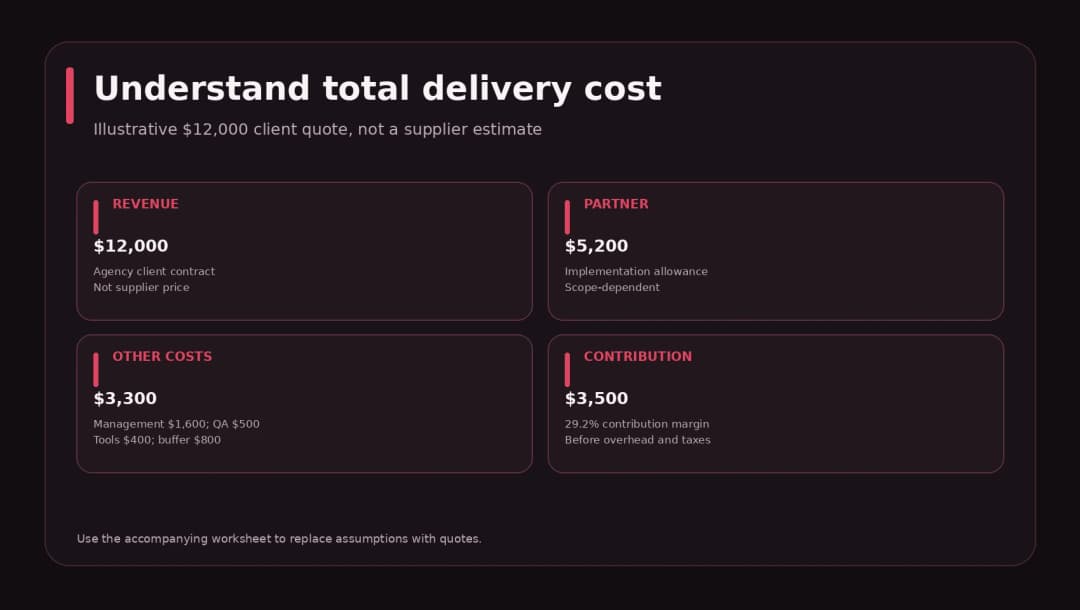
Suppose you quote your client $12,000 for a WordPress redesign. Your partner proposes $5,200 for implementation. Your internal project management and design-review time costs $1,600, independent QA costs $500, and software/launch expenses cost $400. You reserve $800 as contingency. Total planned delivery cost: $8,500. Estimated contribution: $3,500, or 29.2% of client revenue.
Those figures are an invented planning scenario, not a real customer project or quote. They also represent contribution margin, not net profit: agency overhead, acquisition costs, taxes, and owner compensation may reduce the actual outcome.
This is why a white label contract should specify how revisions are priced, what counts as a defect, how estimates change when scope changes, and whether aftercare is included.
Step 8: Run a Small Paid Pilot Before a Major Commitment
A paid pilot tests execution without making either side guess the real effort required. Keep it small enough to review thoroughly and realistic enough to reveal the partner’s habits.
For example: “Build one responsive service-page template from supplied Figma designs using Gutenberg, implement a reusable testimonial pattern, connect a demo form to a test endpoint, and document the editor workflow. Complete the work in a nonproduction WordPress environment.”
Set the acceptance criteria before the partner begins: correct layout at agreed breakpoints, keyboard-operable controls, readable code, no exposed secrets, verified form validation, working deployment to staging, and a 5-minute handoff recording. Ask for a pull request or change log. Pay for the pilot as agreed, even if the provider is not ultimately selected.
A pilot measures a narrow capability and working relationship; it does not prove that the same team can deliver any large, regulated, or high-traffic project. Still, it reveals far more than a generic “we have 10 years of experience” slide.
Step 9: Score the Shortlist Instead of Choosing From Memory
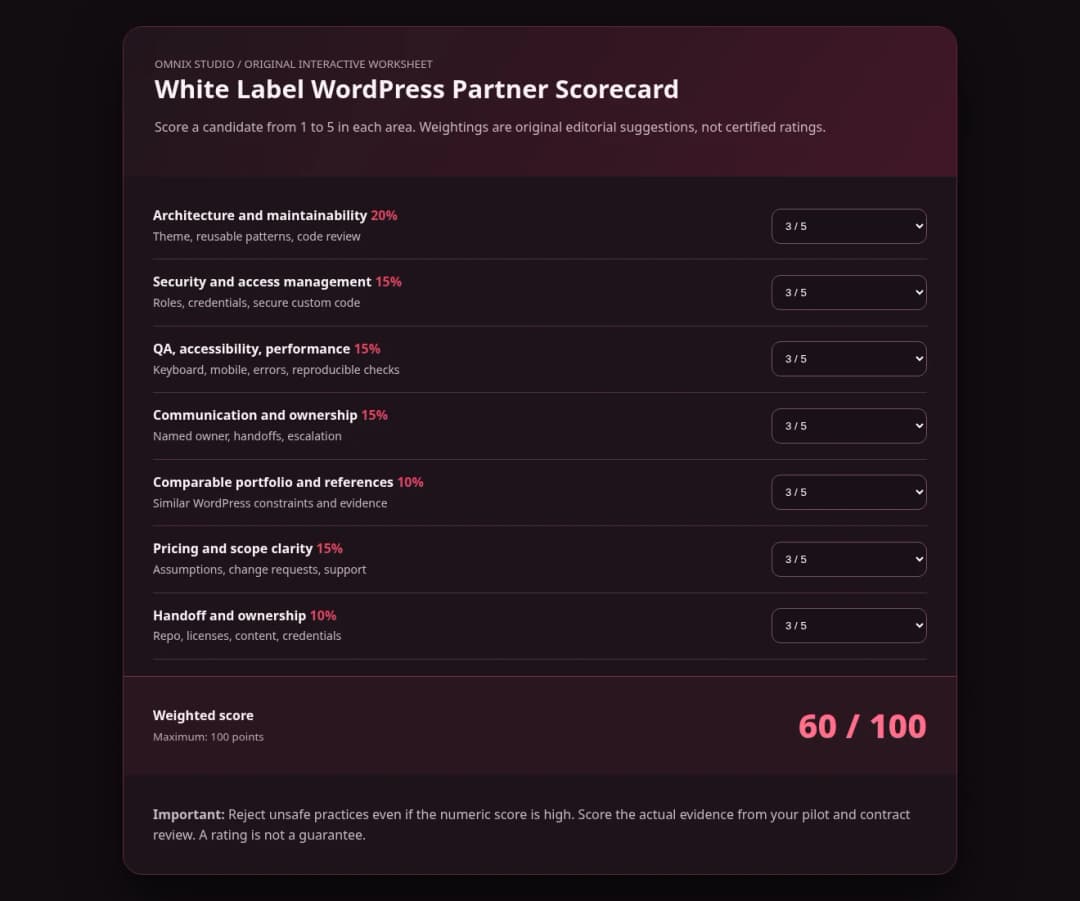
Use a weighted evaluation sheet so price does not overwhelm every other consideration. Below is a proposed scoring framework, not an industry-certified model.
| Criterion | Weight | What qualifies as evidence |
|---|---|---|
| WordPress architecture and maintainability | 20% | Relevant code, editor demo, version control |
| Security and access management | 15% | Sanitized policy and permission demonstrations |
| QA, accessibility, performance | 15% | Test records, agreed acceptance checks |
| Communication and project ownership | 15% | Named lead, cadence, escalation workflow |
| Relevant portfolio and references | 10% | Comparable implementation examples |
| Pricing and scope clarity | 15% | Assumptions, exclusions, support, change rules |
| Handoff and ownership | 10% | Code/assets transfer, licenses, documentation |
Score each category from 1 to 5 and multiply by its weight. More important than the final number is the discussion it forces. A bargain bid with no production access policy may deserve rejection regardless of its total. Define non-negotiable red flags separately: refusal to explain data access, unclear code ownership, no rollback plan, and unwillingness to work under agreed confidentiality terms.
Step 10: Set Contract Boundaries Before Kickoff
A contract should make operational realities explicit. Agency owners sometimes use a generic NDA and assume everything else is understood. It rarely is.
Document these terms with appropriate legal review: project scope and acceptance; whether subcontracting is permitted; confidentiality and approved portfolio use; intellectual property and source-code delivery; third-party themes, plugins and asset licenses; hosting, domain, and account ownership; payment milestones; change requests; warranties and defect-remediation periods; incident notification; client contact rules; termination; and practical exit/handover steps.
Avoid writing obligations no one can meet. For example, “unlimited revisions” invites conflict. A more useful arrangement defines included review rounds, what constitutes a bug against agreed acceptance criteria, and what triggers a new change order. “100% secure” and “no SEO impact” are not realistic guarantees for complex websites.
Licensing deserves special attention. A site may use premium tools acquired under a provider’s developer subscription. Ask who retains access after handoff and whether the client’s domain is covered under the license. WordPress core is open source, but third-party assets and commercial service terms can be separate.
Step 11: Build a Launch Process With Named Owners
Before launch, produce a release checklist and require sign-off for each high-risk area. The partner should never be forced to infer who owns DNS or who can authorize customer-facing downtime.
A robust process includes backups with a tested restoration route; environment and credential audit; final content checks; responsive and keyboard checks; form and email delivery tests; integrations; redirects and canonical tags where URLs change; analytics and consent tests; cache/CDN rules; and an agreed launch window.
For URL changes, Google’s site-move guidance recommends mapping old URLs to new destinations, applying server-side permanent redirects where appropriate, updating signals, and monitoring traffic afterward. It also warns that significant migrations may cause temporary ranking fluctuations. A partner cannot credibly promise that SEO rankings will remain unchanged after an architectural migration. [9]
After launch, agree which team handles 404s, plugin updates, regression bugs, content corrections, monitoring alerts, and emergency rollback. The handoff should contain an environment inventory, deployment steps, admin training, integration list, source repository, licenses and expiration dates, and support contacts.
Step 12: Start With a 30-Day Partner Trial
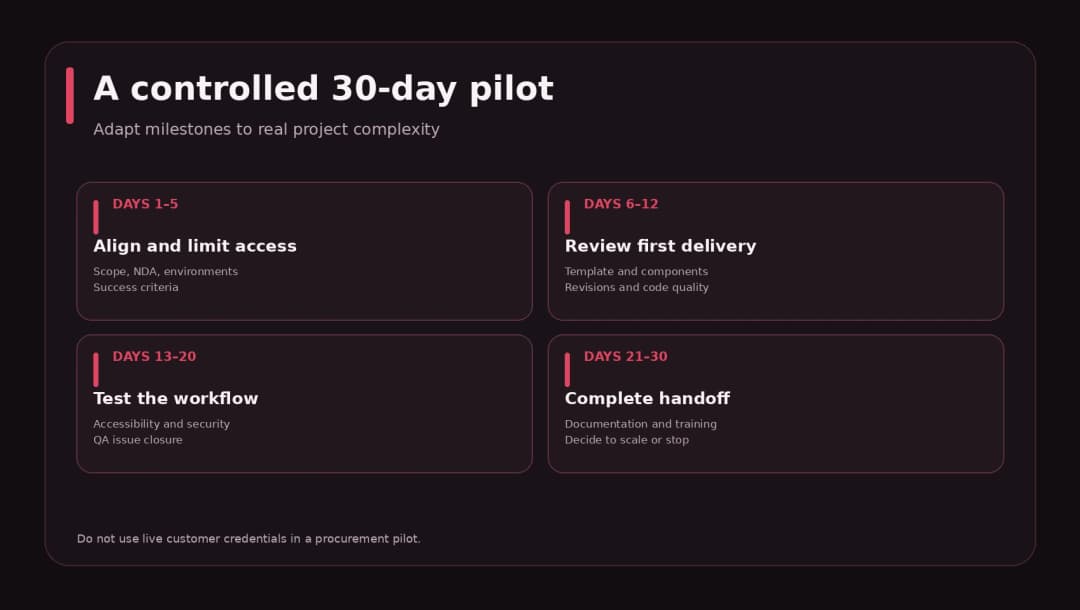
Days 1–5: Scope and access. Select a limited project, agree confidentiality terms, list dependencies, create role-limited accounts, and document a test/staging environment.
Days 6–12: Design-to-development pilot. Review the first page/template against acceptance criteria. Ask the partner to explain tradeoffs instead of silently rewriting the scope.
Days 13–20: QA and controlled changes. Test mobile, keyboard use, forms, plugin compatibility, code review, and revision turnaround. Record issues and whether their owners close them as promised.
Days 21–30: Handoff and decision. Have someone else edit content, inspect documentation, verify access ownership, and close the contract’s pilot milestone. Decide to scale, extend the trial with a specific remediation target, or part ways.
This calendar is illustrative. A two-week landing page and a complicated WooCommerce integration should not be forced into the same timeline. What matters is defined checkpoints and evidence.
Warning Signs When Hiring a White Label WordPress Agency
An agency may be a poor fit when it refuses to identify accountable roles, won’t agree to a staging workflow, says every problem is solved by installing another plugin, cannot explain accessibility checks, treats security as a single scanner score, or uses pricing that excludes routine deployment and bug fixing without warning.
Also be cautious with blanket claims: “any website in 24 hours,” “guaranteed perfect PageSpeed,” and “no ranking loss.” Good suppliers explain what can be controlled, what depends on third parties, and what evidence will be delivered. They may tell you that a requirement is expensive or unnecessary. That honesty is an asset.
Not every red flag is fatal. A small excellent studio might have fewer formal policy documents than a large provider. Ask it to demonstrate its process through a pilot and articulate ownership. Judge the actual risk against the client’s needs.
Questions to Ask on Your First Partner Call
- Which WordPress projects are closest to this brief, and what work did your team do?
- Who reviews code, who owns QA, and who is the escalation contact?
- How do you use Gutenberg, custom blocks, and
theme.json, and when would you choose a different approach? - What happens if a premium plugin update breaks a custom integration?
- Can you demonstrate a staging preview, pull request, and release checklist?
- How do you secure credentials and limit production access?
- Who owns the code, hosting, plugins, and licenses after payment?
- What qualifies as a bug versus a new feature request?
- How do you handle accessibility testing and realistic performance measurement?
- What does your final handoff include, and can we run a paid pilot first?
Use the answers to update your scorecard, rather than treating the call as a personality contest. A partner relationship is an operating system between two teams.
What a Good White Label WordPress Proposal Should Include
A useful proposal identifies deliverables, functionality, responsibilities, milestones, assumptions, review rounds, excluded scope, technical dependencies, testing method, deployment responsibility, support window, and prices for changes.
For complex projects, require a small risk register: CRM integration may need client credentials; design source may omit mobile/error states; content may be unfinished; a hosting provider may not support a needed server feature. This is not negative selling. It lets your agency communicate realistically with the client before surprises become expensive.
Avoid comparing proposals solely by total price until you normalize scope. One quote may include migration and training; another may cover page templates only. Their totals cannot be compared meaningfully without adjustment.
How Omnix Studio Supports Agency Partners
If you need an external team for WordPress development, website UI/UX, landing pages, or broader design-and-build execution, explore Omnix Studio’s agency partnerships and white label development services. The best partnership starts with a defined brief, a realistic delivery model, and a conversation about where your agency wants to retain control.
Related reading: How to create a website wireframe, AI design tools and UI workflows, and Omnix Studio’s development services. Replace category-level blog links with verified relevant published article URLs during CMS preparation. Do not link to October articles that are still drafts.
Frequently Asked Questions
Is white label WordPress development legal?
The arrangement is a common commercial delivery model, but the details depend on contracts, jurisdiction, intellectual property, licenses, data processing, and client agreements. Have relevant counsel review your terms rather than assuming an NDA alone resolves everything.
Can I hire a white label WordPress agency for a single project?
Yes. A single-project engagement or paid pilot can be a sensible first step. Retainers become useful when your agency has a predictable pipeline and needs reserved delivery capacity.
What is the difference between a WordPress freelancer and a white label agency?
A freelancer generally provides an individual’s time and expertise. An agency may provide several roles, reviews, QA, continuity, and delivery management. This varies by provider: ask what is actually included rather than inferring capability from the label.
How much does a white label WordPress agency cost?
There is no universal white label price. Clutch’s broader 2026 web-development survey shows common agency hourly rates around $25–$49, with strong variation by region and requirements. White label terms can differ. Use a scope-based estimate and include review, QA, licensing, contingency, and support. [8]
Can the partner contact my clients directly?
Only under the communication arrangement you agree upon. Specify client contact, attendance at meetings, brand representation, and confidentiality in writing. Avoid misrepresenting anyone’s role or employment.
How can I check whether the partner’s code is secure?
Require secure-development practices, review of authorization and input handling, dependency hygiene, and risk-proportionate testing. WordPress security guidelines and OWASP ASVS can help define evidence, but a single automated scan is not sufficient. [4][6]
Who should own the WordPress site and licenses?
The agreement should name owners of the domain, hosting, repository, design files, deployment access, commercial extensions, and content. Usually the client should have practical continuity after handoff, but the right allocation depends on the service contract and third-party license terms.
Research Notes and Sources
Research reviewed October 14, 2026. Claims about WordPress, accessibility, security, pricing, and SEO migration are based on official or current sources. The scorecard, paid pilot process, 30-day plan, and financial example are original editorial frameworks, not an independently validated industry benchmark. No client outcomes or hands-on supplier audits are claimed.
[1] WordPress Theme Handbook: https://developer.wordpress.org/themes/
[2] WordPress theme.json guide: https://developer.wordpress.org/themes/global-settings-and-styles/introduction-to-theme-json/
[3] WordPress Plugin Handbook introduction: https://developer.wordpress.org/plugins/intro/
[4] WordPress security handbook: https://developer.wordpress.org/apis/security/
[5] WordPress nonces and authorization: https://developer.wordpress.org/apis/security/nonces/
[6] OWASP ASVS: https://owasp.github.io/www-project-application-security-verification-standard/
[7] WCAG overview: https://www.w3.org/WAI/standards-guidelines/wcag/
[8] Clutch web development pricing, updated September 21, 2026: https://clutch.co/web-developers/pricing
[9] Google Search Central site-move guidance: https://developers.google.com/search/docs/crawling-indexing/site-move-with-url-changes